09 Exercises 1: Intro and Global Climatology
Contents
09 Exercises 1: Intro and Global Climatology
UW Geospatial Data Analysis
CEE498/CEWA599
David Shean
Objectives
Introduce xarray data model for N-d array analysis
Practice basic N-d array slicing, grouping and aggregation
Explore global and local climate reanalysis data
import os
from glob import glob
import numpy as np
import xarray as xr
import pandas as pd
import geopandas as gpd
import cartopy.crs as ccrs
import matplotlib.pyplot as plt
import holoviews as hv
Part 1: Global climatology
Monthly temperature from 1979-2021
Two datasets are provided:
Climatology - long-term mean monthly values ofrom 1979-2021 (12 grids)
Anomaly - monthly difference from long-term monthly mean (505 grids from 1979-2021)
https://cds.climate.copernicus.eu/cdsapp#!/dataset/ecv-for-climate-change?tab=overview
%pwd
'/home/jovyan/gda_course_2022_solutions/modules/09_NDarrays_xarray_ERA5'
Open the processed global monthly temperature anomaly and climatology NetCDF files
See relevant doc on opening and writing files: http://xarray.pydata.org/en/stable/io.html
Note that processing and saving the anomalies could take some time, as you’re reading in 480 files and saving a large nc file
Take a moment to review the steps in the
grib2ncfunction of the download notebook, and review the io doc for xarrayNote the
open_datasetandconcatfunctions
outdir = 'era5_data'
t_clim_fn = os.path.join(outdir, 'climatology_0.25g_ea_2t.nc')
t_clim_ds = xr.open_dataset(t_clim_fn)
t_anom_fn = os.path.join(outdir, '1month_anomaly_Global_ea_2t.nc')
t_anom_ds = xr.open_dataset(t_anom_fn, chunks='auto')
Inspect the DataSets
Discuss with your neighbor
Review the output of the
info()methodNote the number of time entries in each DataSet
What are the min and max longitude, min and max latitude
Note: The timestamp listed in the climatology dataset for each month is arbitrarily listed as 2018 (e.g., ‘2018-01-01’)
Remember these are mean values for each month of the year (12 total) across the entire 1979-2021 period
print info for the ‘t2m’ DataArray (temperature 2 m above ground)
t_clim_ds
<xarray.Dataset>
Dimensions: (time: 12, latitude: 721, longitude: 1440)
Coordinates:
* time (time) datetime64[ns] 1981-01-01 1981-02-01 ... 1981-12-01
* latitude (latitude) float64 90.0 89.75 89.5 89.25 ... -89.5 -89.75 -90.0
* longitude (longitude) float64 0.0 0.25 0.5 0.75 ... 359.0 359.2 359.5 359.8
Data variables:
t2m (time, latitude, longitude) float32 ...
Attributes:
GRIB_edition: 1
GRIB_centre: ecmf
GRIB_centreDescription: European Centre for Medium-Range Weather Forecasts
GRIB_subCentre: 0
Conventions: CF-1.7
institution: European Centre for Medium-Range Weather Forecasts
history: 2022-02-28T07:58 GRIB to CDM+CF via cfgrib-0.9.1...- time: 12
- latitude: 721
- longitude: 1440
- time(time)datetime64[ns]1981-01-01 ... 1981-12-01
- long_name :
- initial time of forecast
- standard_name :
- forecast_reference_time
array(['1981-01-01T00:00:00.000000000', '1981-02-01T00:00:00.000000000', '1981-03-01T00:00:00.000000000', '1981-04-01T00:00:00.000000000', '1981-05-01T00:00:00.000000000', '1981-06-01T00:00:00.000000000', '1981-07-01T00:00:00.000000000', '1981-08-01T00:00:00.000000000', '1981-09-01T00:00:00.000000000', '1981-10-01T00:00:00.000000000', '1981-11-01T00:00:00.000000000', '1981-12-01T00:00:00.000000000'], dtype='datetime64[ns]') - latitude(latitude)float6490.0 89.75 89.5 ... -89.75 -90.0
- units :
- degrees_north
- standard_name :
- latitude
- long_name :
- latitude
- stored_direction :
- decreasing
array([ 90. , 89.75, 89.5 , ..., -89.5 , -89.75, -90. ])
- longitude(longitude)float640.0 0.25 0.5 ... 359.2 359.5 359.8
- units :
- degrees_east
- standard_name :
- longitude
- long_name :
- longitude
array([0.0000e+00, 2.5000e-01, 5.0000e-01, ..., 3.5925e+02, 3.5950e+02, 3.5975e+02])
- t2m(time, latitude, longitude)float32...
- GRIB_paramId :
- 167
- GRIB_dataType :
- an
- GRIB_numberOfPoints :
- 1038240
- GRIB_typeOfLevel :
- surface
- GRIB_stepUnits :
- 1
- GRIB_stepType :
- avgua
- GRIB_gridType :
- regular_ll
- GRIB_NV :
- 0
- GRIB_Nx :
- 1440
- GRIB_Ny :
- 721
- GRIB_cfName :
- unknown
- GRIB_cfVarName :
- t2m
- GRIB_gridDefinitionDescription :
- Latitude/Longitude Grid
- GRIB_iDirectionIncrementInDegrees :
- 0.25
- GRIB_iScansNegatively :
- 0
- GRIB_jDirectionIncrementInDegrees :
- 0.25
- GRIB_jPointsAreConsecutive :
- 0
- GRIB_jScansPositively :
- 0
- GRIB_latitudeOfFirstGridPointInDegrees :
- 90.0
- GRIB_latitudeOfLastGridPointInDegrees :
- -90.0
- GRIB_longitudeOfFirstGridPointInDegrees :
- 0.0
- GRIB_longitudeOfLastGridPointInDegrees :
- 359.75
- GRIB_missingValue :
- 9999
- GRIB_name :
- 2 metre temperature
- GRIB_shortName :
- 2t
- GRIB_totalNumber :
- 0
- GRIB_units :
- K
- long_name :
- 2 metre temperature
- units :
- K
- standard_name :
- unknown
- coordinates :
- number time step surface latitude longitude valid_time
[12458880 values with dtype=float32]
- GRIB_edition :
- 1
- GRIB_centre :
- ecmf
- GRIB_centreDescription :
- European Centre for Medium-Range Weather Forecasts
- GRIB_subCentre :
- 0
- Conventions :
- CF-1.7
- institution :
- European Centre for Medium-Range Weather Forecasts
- history :
- 2022-02-28T07:58 GRIB to CDM+CF via cfgrib-0.9.10.0/ecCodes-2.24.2 with {"source": "ecv-for-climate-change_t2m_climatology/climatology_0.25g_ea_2t_01_1981-2010_v02.grib", "filter_by_keys": {}, "encode_cf": ["parameter", "time", "geography", "vertical"]}
t_anom_ds
<xarray.Dataset>
Dimensions: (time: 517, latitude: 721, longitude: 1440)
Coordinates:
* time (time) datetime64[ns] 1979-01-01 1979-02-01 ... 2022-01-01
* latitude (latitude) float64 90.0 89.75 89.5 89.25 ... -89.5 -89.75 -90.0
* longitude (longitude) float64 0.0 0.25 0.5 0.75 ... 359.0 359.2 359.5 359.8
Data variables:
t2m (time, latitude, longitude) float32 dask.array<chunksize=(222, 312, 480), meta=np.ndarray>
Attributes:
GRIB_edition: 1
GRIB_centre: ecmf
GRIB_centreDescription: European Centre for Medium-Range Weather Forecasts
GRIB_subCentre: 0
Conventions: CF-1.7
institution: European Centre for Medium-Range Weather Forecasts
history: 2022-02-28T07:59 GRIB to CDM+CF via cfgrib-0.9.1...- time: 517
- latitude: 721
- longitude: 1440
- time(time)datetime64[ns]1979-01-01 ... 2022-01-01
- long_name :
- initial time of forecast
- standard_name :
- forecast_reference_time
array(['1979-01-01T00:00:00.000000000', '1979-02-01T00:00:00.000000000', '1979-03-01T00:00:00.000000000', ..., '2021-11-01T00:00:00.000000000', '2021-12-01T00:00:00.000000000', '2022-01-01T00:00:00.000000000'], dtype='datetime64[ns]') - latitude(latitude)float6490.0 89.75 89.5 ... -89.75 -90.0
- units :
- degrees_north
- standard_name :
- latitude
- long_name :
- latitude
- stored_direction :
- decreasing
array([ 90. , 89.75, 89.5 , ..., -89.5 , -89.75, -90. ])
- longitude(longitude)float640.0 0.25 0.5 ... 359.2 359.5 359.8
- units :
- degrees_east
- standard_name :
- longitude
- long_name :
- longitude
array([0.0000e+00, 2.5000e-01, 5.0000e-01, ..., 3.5925e+02, 3.5950e+02, 3.5975e+02])
- t2m(time, latitude, longitude)float32dask.array<chunksize=(222, 312, 480), meta=np.ndarray>
- GRIB_paramId :
- 167
- GRIB_dataType :
- an
- GRIB_numberOfPoints :
- 1038240
- GRIB_typeOfLevel :
- surface
- GRIB_stepUnits :
- 1
- GRIB_stepType :
- avgua
- GRIB_gridType :
- regular_ll
- GRIB_NV :
- 0
- GRIB_Nx :
- 1440
- GRIB_Ny :
- 721
- GRIB_cfName :
- unknown
- GRIB_cfVarName :
- t2m
- GRIB_gridDefinitionDescription :
- Latitude/Longitude Grid
- GRIB_iDirectionIncrementInDegrees :
- 0.25
- GRIB_iScansNegatively :
- 0
- GRIB_jDirectionIncrementInDegrees :
- 0.25
- GRIB_jPointsAreConsecutive :
- 0
- GRIB_jScansPositively :
- 0
- GRIB_latitudeOfFirstGridPointInDegrees :
- 90.0
- GRIB_latitudeOfLastGridPointInDegrees :
- -90.0
- GRIB_longitudeOfFirstGridPointInDegrees :
- 0.0
- GRIB_longitudeOfLastGridPointInDegrees :
- 359.75
- GRIB_missingValue :
- 9999
- GRIB_name :
- 2 metre temperature
- GRIB_shortName :
- 2t
- GRIB_totalNumber :
- 0
- GRIB_units :
- K
- long_name :
- 2 metre temperature
- units :
- K
- standard_name :
- unknown
- coordinates :
- number time step surface latitude longitude valid_time
Array Chunk Bytes 2.00 GiB 126.83 MiB Shape (517, 721, 1440) (222, 312, 480) Count 28 Tasks 27 Chunks Type float32 numpy.ndarray
- GRIB_edition :
- 1
- GRIB_centre :
- ecmf
- GRIB_centreDescription :
- European Centre for Medium-Range Weather Forecasts
- GRIB_subCentre :
- 0
- Conventions :
- CF-1.7
- institution :
- European Centre for Medium-Range Weather Forecasts
- history :
- 2022-02-28T07:59 GRIB to CDM+CF via cfgrib-0.9.10.0/ecCodes-2.24.2 with {"source": "ecv-for-climate-change_t2m_anomaly/1month_anomaly_Global_ea_2t_197901_1981-2010_v02.grib", "filter_by_keys": {}, "encode_cf": ["parameter", "time", "geography", "vertical"]}
Convert the temperature values from K to C for the climatology dataset
Note: don’t need to do this for anomalies, as they are relative values, not absolute
These operations are done on the DataArray level (not the top-level DataSet object level), so you’ll need to modify
t_clim_ds['t2m']You can use
-=syntax hereOr, update the
t_clim_ds['t2m'].values
Make sure you also update the units
The units used by xarray are stored in the t_clim_ds[‘t2m’].attrs dictionary
There is also a GRIB units variable, but this is holdover from the grib to xarray conversion
Sanity check values
Set the longitude values to be (-180 to 180) instead of (0 to 360)
Could also store as new set of coordinates called
longitude_180or something
def ds_swaplon(ds):
return ds.assign_coords(longitude=(((ds.longitude + 180) % 360) - 180)).sortby('longitude')
t_clim_ds = ds_swaplon(t_clim_ds)
t_anom_ds = ds_swaplon(t_anom_ds)
/srv/conda/envs/notebook/lib/python3.9/site-packages/xarray/core/indexing.py:1227: PerformanceWarning: Slicing is producing a large chunk. To accept the large
chunk and silence this warning, set the option
>>> with dask.config.set(**{'array.slicing.split_large_chunks': False}):
... array[indexer]
To avoid creating the large chunks, set the option
>>> with dask.config.set(**{'array.slicing.split_large_chunks': True}):
... array[indexer]
return self.array[key]
t_clim_ds.longitude
<xarray.DataArray 'longitude' (longitude: 1440)> array([-180. , -179.75, -179.5 , ..., 179.25, 179.5 , 179.75]) Coordinates: * longitude (longitude) float64 -180.0 -179.8 -179.5 ... 179.2 179.5 179.8
- longitude: 1440
- -180.0 -179.8 -179.5 -179.2 -179.0 ... 178.8 179.0 179.2 179.5 179.8
array([-180. , -179.75, -179.5 , ..., 179.25, 179.5 , 179.75])
- longitude(longitude)float64-180.0 -179.8 ... 179.5 179.8
array([-180. , -179.75, -179.5 , ..., 179.25, 179.5 , 179.75])
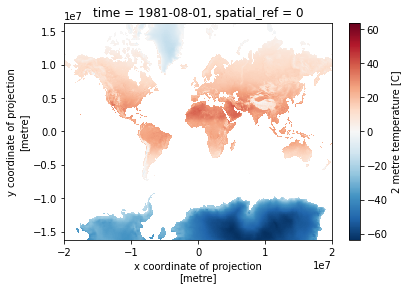
Isolate the August array and plot
Review different strategies for selection here: http://xarray.pydata.org/en/stable/indexing.html
Use the
iselmethod with dimension name and integer index (time=7)Use the
selmethod with dimension name and label (time='2016-08-01')Note: plot.imshow is much more efficient for regular grids, than the default plot contourf
#See time dimension index
t_clim_ds.time
<xarray.DataArray 'time' (time: 12)>
array(['1981-01-01T00:00:00.000000000', '1981-02-01T00:00:00.000000000',
'1981-03-01T00:00:00.000000000', '1981-04-01T00:00:00.000000000',
'1981-05-01T00:00:00.000000000', '1981-06-01T00:00:00.000000000',
'1981-07-01T00:00:00.000000000', '1981-08-01T00:00:00.000000000',
'1981-09-01T00:00:00.000000000', '1981-10-01T00:00:00.000000000',
'1981-11-01T00:00:00.000000000', '1981-12-01T00:00:00.000000000'],
dtype='datetime64[ns]')
Coordinates:
* time (time) datetime64[ns] 1981-01-01 1981-02-01 ... 1981-12-01
Attributes:
long_name: initial time of forecast
standard_name: forecast_reference_time- time: 12
- 1981-01-01 1981-02-01 1981-03-01 ... 1981-10-01 1981-11-01 1981-12-01
array(['1981-01-01T00:00:00.000000000', '1981-02-01T00:00:00.000000000', '1981-03-01T00:00:00.000000000', '1981-04-01T00:00:00.000000000', '1981-05-01T00:00:00.000000000', '1981-06-01T00:00:00.000000000', '1981-07-01T00:00:00.000000000', '1981-08-01T00:00:00.000000000', '1981-09-01T00:00:00.000000000', '1981-10-01T00:00:00.000000000', '1981-11-01T00:00:00.000000000', '1981-12-01T00:00:00.000000000'], dtype='datetime64[ns]') - time(time)datetime64[ns]1981-01-01 ... 1981-12-01
- long_name :
- initial time of forecast
- standard_name :
- forecast_reference_time
array(['1981-01-01T00:00:00.000000000', '1981-02-01T00:00:00.000000000', '1981-03-01T00:00:00.000000000', '1981-04-01T00:00:00.000000000', '1981-05-01T00:00:00.000000000', '1981-06-01T00:00:00.000000000', '1981-07-01T00:00:00.000000000', '1981-08-01T00:00:00.000000000', '1981-09-01T00:00:00.000000000', '1981-10-01T00:00:00.000000000', '1981-11-01T00:00:00.000000000', '1981-12-01T00:00:00.000000000'], dtype='datetime64[ns]')
- long_name :
- initial time of forecast
- standard_name :
- forecast_reference_time
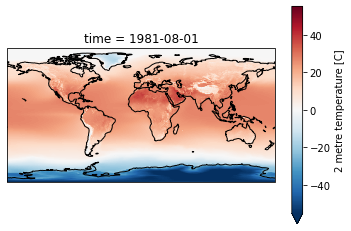
Create a plot for August, overlaying coastlines with cartopy
Use a simple PlateCaree() projection as in example here:
Once you have your axes setup, you should be able to plot with xarray easily (pass the axes object to plot() function:
http://xarray.pydata.org/en/stable/plotting.html#maps
Don’t use a discrete color ramp as in some of the examples, use a continuous linear color ramp, as in the facet plot.
Note how 2-m temperature varies with elevation (e.g., see the Tibetan Plateau)
f = plt.figure()
ax = plt.axes(projection=ccrs.PlateCarree())
ax.coastlines()
t_clim_ds['t2m'].sel(time=ts).plot.imshow(ax=ax, robust=True);
Create a Facet plot showing temperature grids for each month in the climatology DataSet
Note that these plots can be memory hungry, and if you have other kernels running, this could fill RAM and cause kernel to stop
Could try isolating a smaller area to test (see slicing) then running on full dataset when satisfied
Make sure your units are correct in the colorbar
While they may look similar, each panel is slightly different
Take a moment to admire this, look at seasonal cycles
Use Holoviz for interactive plotting
Multiple plotting backends can be used with xarray
We previously used Seaborn, and folium/ipyleaflet for interactive maps
Still under development, but
hvplotis flexible and powerful:
import hvplot.xarray
Create interactive plot with hvplot()
Note how coordinates and values are interactively displayed as you move your cursor over the plot
Experiment with time slider on right side
Experiment with zoom/pan capability
t_clim_ds['t2m'].hvplot(x='longitude',y='latitude', cmap='RdBu_r', clim=(-50,50))
Create line plot of global monthly temperature
Compute the mean of the climatology t2m DataArray across the spatial dimensions
Remember to pass
dim=('latitude', 'longitude')so xarray knows over which dimensions to compute the mean!)
#Not this! Gives a single value for full array
#t_clim_ds['t2m'].mean()
Create 2D plots showing mean temperature vs. latitude (averaged over all longitudes)
Create line plots of mean zonal and meridional temperature
Hint: specify a tuple of appropriate dimensions for the
dimkeyword when computingmean()Above we used
dim=('latitude', 'longitude')to average all latitudes and longitudes, plotting the resulting values over timeNow in the zonal mean case, we want to average for all latitudes and times, plotting resulting values vs. longitude
Create as figure with two subplots: meridional mean T and zonal mean T
Add titles accordingly
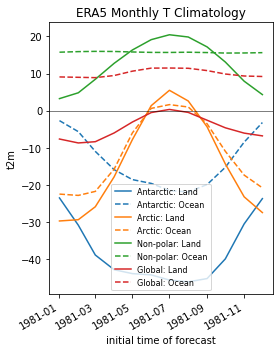
Create a plot showing monthly mean temperature for the Arctic and Antarctic
See location indexing here: http://xarray.pydata.org/en/stable/indexing.html#assigning-values-with-indexing
One approach:
Create boolean index arrays for
t_clim_ds['latitude']coordinate for relevant latitude rangesUse Arctic circle and Antarctic circle as a threshold
Use the index array with xarray
wheremethod on thet_clim_ds['t2m']DataArrayMake sure to use
drop=Trueto avoid unnecessarily storing lots of nan values in memory
Compute the mean across all returned lat/lon grid cells
Note the magnitude and phase of the seasonal temperature varability at the opposite poles
polar_lat = 66.5
#arctic_idx = slice(polar_lat,90)
arctic_idx = (t_clim_ds['latitude'] >= polar_lat)
antarctic_idx = (t_clim_ds['latitude'] <= -polar_lat)
nonpolar_idx = (t_clim_ds['latitude'] < polar_lat) & (t_clim_ds['latitude'] > -polar_lat)
#Sanity check
#arctic_idx[::10]
#antarctic_idx[::10]
#nonpolar_idx[::10]
Extra Credit: Repeat the above analysis, isolating land and ocean classes
Hint: can use
rioxarrayfor clipping using a GeoDataFrame or geometry
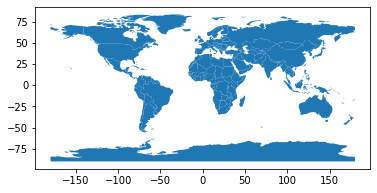
Open the world polygons
world = gpd.read_file(gpd.datasets.get_path('naturalearth_lowres'))
#Hack to set to latest PROJ syntax, instead of 'init'
world.crs = 'EPSG:4326'
world.plot();
Use rioxarray clip function
Code and documentation is still under development, but you can read more here:
import rioxarray
#Need to first set CRS
t_clim_ds.rio.write_crs(world.crs, inplace=True);
print(t_clim_ds.spatial_ref)
<xarray.DataArray 'spatial_ref' ()>
array(0)
Coordinates:
spatial_ref int64 0
Attributes:
crs_wkt: GEOGCS["WGS 84",DATUM["WGS_1984",SPHEROID["...
semi_major_axis: 6378137.0
semi_minor_axis: 6356752.314245179
inverse_flattening: 298.257223563
reference_ellipsoid_name: WGS 84
longitude_of_prime_meridian: 0.0
prime_meridian_name: Greenwich
geographic_crs_name: WGS 84
grid_mapping_name: latitude_longitude
spatial_ref: GEOGCS["WGS 84",DATUM["WGS_1984",SPHEROID["...
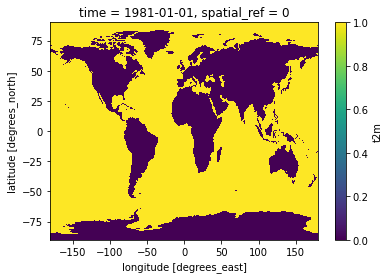
#Mask values over ocean
t_clim_ds_land = t_clim_ds['t2m'].rio.clip(world.geometry, crs=world.crs, drop=False)
#Invert to mask values over land
t_clim_ds_ocean = t_clim_ds['t2m'].rio.clip(world.geometry, crs=world.crs, drop=False, invert=True)
#Preview land mask
t_clim_ds_land.isel(time=0).isnull().plot();
print(t_clim_ds_land.spatial_ref)
<xarray.DataArray 'spatial_ref' ()>
array(0)
Coordinates:
spatial_ref int64 0
Attributes:
crs_wkt: GEOGCS["WGS 84",DATUM["WGS_1984",SPHEROID["...
semi_major_axis: 6378137.0
semi_minor_axis: 6356752.314245179
inverse_flattening: 298.257223563
reference_ellipsoid_name: WGS 84
longitude_of_prime_meridian: 0.0
prime_meridian_name: Greenwich
geographic_crs_name: WGS 84
grid_mapping_name: latitude_longitude
spatial_ref: GEOGCS["WGS 84",DATUM["WGS_1984",SPHEROID["...
GeoTransform: -180.125 0.25 0.0 90.125 0.0 -0.25
Side note: reprojecting with rioxarray
First need to assigning a crs to the xarray dataset
We did this above
t_clim_ds.rio.write_crs(world.crs, inplace=True);
Can then use
xds.rio.reproject()https://corteva.github.io/rioxarray/stable/examples/reproject.html
reproj_test = t_clim_ds_land.isel(time=7).rio.reproject("EPSG:3857")
print(reproj_test.spatial_ref)
reproj_test.plot.imshow();
<xarray.DataArray 'spatial_ref' ()>
array(0)
Coordinates:
time datetime64[ns] 1981-08-01
spatial_ref int64 0
Attributes:
crs_wkt: PROJCS["WGS 84 / Pseudo-Mercator",GEOGCS["WGS 84",DATUM["W...
spatial_ref: PROJCS["WGS 84 / Pseudo-Mercator",GEOGCS["WGS 84",DATUM["W...
GeoTransform: -20037481.165179186 32074.29135072323 0.0 16294357.0062469...
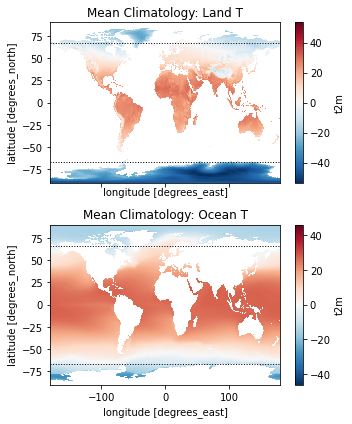
f, axa = plt.subplots(2,1, sharex=True, sharey=True, figsize=(5,6))
t_clim_ds_land.mean(dim='time').plot(ax=axa[0], cmap='RdBu_r', clim=(-50,50))
t_clim_ds_ocean.mean(dim='time').plot(ax=axa[1], cmap='RdBu_r', clim=(-50,50))
axa[0].set_title('Mean Climatology: Land T')
axa[1].set_title('Mean Climatology: Ocean T')
kwargs = dict(color='k', lw=1.0, ls=':')
axa[0].axhline(polar_lat, **kwargs)
axa[0].axhline(-polar_lat, **kwargs)
axa[1].axhline(polar_lat, **kwargs)
axa[1].axhline(-polar_lat, **kwargs)
plt.tight_layout()
f, ax = plt.subplots(figsize=(4,5))
t_clim_ds_land.where(antarctic_idx, drop=True).mean(dim=('latitude', 'longitude')).plot(ax=ax, color='C0', ls='-', label='Antarctic: Land')
t_clim_ds_ocean.where(antarctic_idx, drop=True).mean(dim=('latitude', 'longitude')).plot(ax=ax, color='C0', ls='--', label='Antarctic: Ocean')
t_clim_ds_land.where(arctic_idx, drop=True).mean(dim=('latitude', 'longitude')).plot(ax=ax, color='C1', ls='-', label='Arctic: Land')
t_clim_ds_ocean.where(arctic_idx, drop=True).mean(dim=('latitude', 'longitude')).plot(ax=ax, color='C1', ls='--', label='Arctic: Ocean')
t_clim_ds_land.where(nonpolar_idx, drop=True).mean(dim=('latitude', 'longitude')).plot(ax=ax, color='C2', ls='-', label='Non-polar: Land')
t_clim_ds_ocean.where(nonpolar_idx, drop=True).mean(dim=('latitude', 'longitude')).plot(ax=ax, color='C2', ls='--', label='Non-polar: Ocean')
t_clim_ds_land.mean(dim=('latitude', 'longitude')).plot(ax=ax, color='C3', ls='-', label='Global: Land')
t_clim_ds_ocean.mean(dim=('latitude', 'longitude')).plot(ax=ax, color='C3', ls='--', label='Global: Ocean')
ax.axhline(0, color='k', lw=0.5)
ax.set_title('ERA5 Monthly T Climatology')
ax.legend(fontsize=8);
Temporal Variability: Anomalies
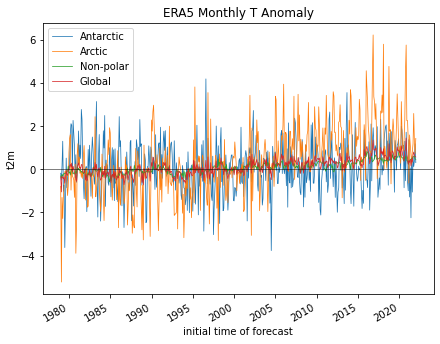
I heard somewhere that climate change was a hoax. Let’s check.
To do this, we will use the monthly anomalies from 1979-present.
Create a line plot of mean global monthly temperature anomaly from 1979-present
This should be a simple one-liner
Note: if you used xarray’s default lazy load of the
ncfile, and this is the first time reading the entiret_anom_dsfrom disk, this may take ~20 seconds
Did the Arctic and Antarctic warm at the same rate over the past 40 years?
Create a line plot showing anomalies for each region, you can reuse indices from above
f, ax = plt.subplots(figsize=(7,5))
kwargs = {'lw':0.75,'ls':'-'}
t_anom_ds['t2m'].where(antarctic_idx, drop=True).mean(dim=('latitude', 'longitude')).plot(ax=ax, label='Antarctic', **kwargs)
t_anom_ds['t2m'].where(arctic_idx, drop=True).mean(dim=('latitude', 'longitude')).plot(ax=ax, label='Arctic', **kwargs)
t_anom_ds['t2m'].where(nonpolar_idx, drop=True).mean(dim=('latitude', 'longitude')).plot(ax=ax, label='Non-polar', **kwargs)
t_anom_ds['t2m'].mean(dim=('latitude', 'longitude')).plot(ax=ax, label='Global', **kwargs)
ax.axhline(0, color='k', lw=0.5)
ax.set_title('ERA5 Monthly T Anomaly')
ax.legend();
#ax.set_xlim('2015-01-01','2019-01-01')
/srv/conda/envs/notebook/lib/python3.9/site-packages/xarray/core/indexing.py:1227: PerformanceWarning: Slicing is producing a large chunk. To accept the large
chunk and silence this warning, set the option
>>> with dask.config.set(**{'array.slicing.split_large_chunks': False}):
... array[indexer]
To avoid creating the large chunks, set the option
>>> with dask.config.set(**{'array.slicing.split_large_chunks': True}):
... array[indexer]
return self.array[key]
Extra credit: compute linear temperature trend at each pixel and create a map with coastlines
Note: can coarsen the data to 1x1° to improve performance (16x!)
t_anom_ds.dims
Frozen({'time': 517, 'latitude': 721, 'longitude': 1440})
ds_factor=4
t_anom_ds_1deg = t_anom_ds.coarsen(latitude=ds_factor, longitude=ds_factor, boundary='trim').mean()
t_anom_ds_1deg.dims
Frozen({'time': 517, 'latitude': 180, 'longitude': 360})
Extra credit: Group temperature anomalies by decade
See pandas/xarray
resamplefunctionRelevant aliases: https://pandas.pydata.org/pandas-docs/stable/user_guide/timeseries.html#dateoffset-objects
How does the most recent decade compare with the first decade in the time series?
Note that most first and last decade in the record might not be “complete” with 10 full years
Clip to WA state
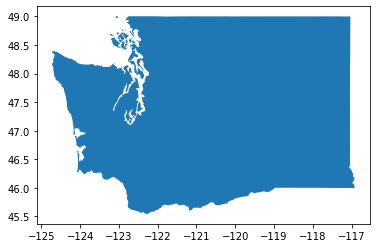
Get the WA state outline
#states_url = 'http://eric.clst.org/assets/wiki/uploads/Stuff/gz_2010_us_040_00_5m.json'
states_url = 'http://eric.clst.org/assets/wiki/uploads/Stuff/gz_2010_us_040_00_500k.json'
states_gdf = gpd.read_file(states_url)
wa_state = states_gdf.loc[states_gdf['NAME'] == 'Washington']
wa_state.plot();
wa_geom = wa_state.iloc[0].geometry
wa_geom

Get rounded bounds on same grid as ERA5
wa_bounds = wa_state.total_bounds
wa_bounds
array([-124.733174, 45.543541, -116.915989, 49.002494])
def myround(x, base=0.25):
return base * np.round(x/base)
def roundbounds(bounds, base=0.25):
bounds_floor = np.floor(bounds/base)*base
bounds_ceil = np.ceil(bounds/base)*base
return [bounds_floor[0], bounds_floor[1], bounds_ceil[2], bounds_ceil[3]]
wa_rbounds = roundbounds(wa_bounds)
wa_rbounds
[-124.75, 45.5, -116.75, 49.25]
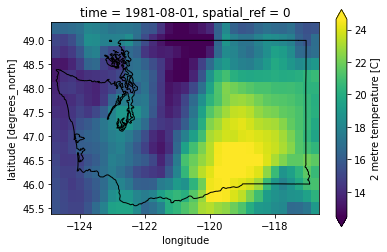
Clip with bounding box selection
t_clim_ds_wa = t_clim_ds.sel(latitude=slice(wa_rbounds[3],wa_rbounds[1]), longitude=slice(wa_rbounds[0],wa_rbounds[2]))
t_anom_ds_wa = t_anom_ds.sel(latitude=slice(wa_rbounds[3],wa_rbounds[1]), longitude=slice(wa_rbounds[0],wa_rbounds[2]))
f, ax = plt.subplots()
t_clim_ds_wa['t2m'].sel(time=ts).plot(ax=ax, robust=True);
wa_state.plot(ax=ax, edgecolor='k', facecolor='none');
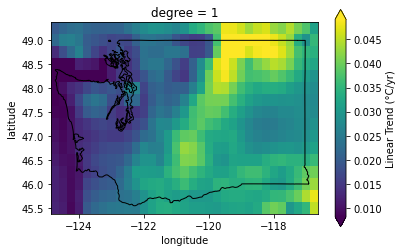
Extra credit: Compute linear temperature trend for WA state
How does this compare with the global temperature trends?
fit = t_anom_ds_wa['t2m'].polyfit(dim='time', deg=1)['polyfit_coefficients']
fit['degree'==1] *= dt_factor * 12
fit.name = 'Linear Trend (°C/yr)'
f, ax = plt.subplots()
fit.sel(degree=1).plot(ax=ax, robust=True);
wa_state.plot(ax=ax, edgecolor='k', facecolor='none');