
Demo: Landsat and Dynamic Data Access
Contents
Demo: Landsat and Dynamic Data Access
UW Geospatial Data Analysis
CEE498/CEWA599
David Shean
Introduction
Hopefully you’ve all seen or used Landsat imagery at some point in the past
Take a few minutes to refresh your memory: https://www.usgs.gov/land-resources/nli/landsat
There is a huge amount of information out there on the Landsat missions, data products, science results
USGS and NASA partnership
Landsat-8
Landsat-8 is the mission (a satellite)
Operatioinial Land Imager (OLI) is an instrument (a camera)
Thermal Infrared Sensor (TIRS) is an insitrument (also a camera, but measures thermal infrared radiation, surface temperature)
Take a look at useful info here:
Orbit and Data collection
Landsat 8 orbits the the Earth in a sun-synchronous, near-polar orbit, at an altitude of 705 km (438 mi), inclined at 98.2 degrees, and completes one Earth orbit every 99 minutes. The satellite has a 16-day repeat cycle with an equatorial crossing time: 10:00 a.m. +/- 15 minutes.
Landsat 8 aquires about 740 scenes a day on the Worldwide Reference System-2 (WRS-2) path/row system, with a swath overlap (or sidelap) varying from 7 percent at the equator to a maximum of approximately 85 percent at extreme latitudes. A Landsat 8 scene size is 185 km x 180 km (114 mi x 112 mi).
Instruments and Bands

So, Landsat-8 sensor is the top row of colored bands in the following figure (lower rows are for older Landsat sensors):
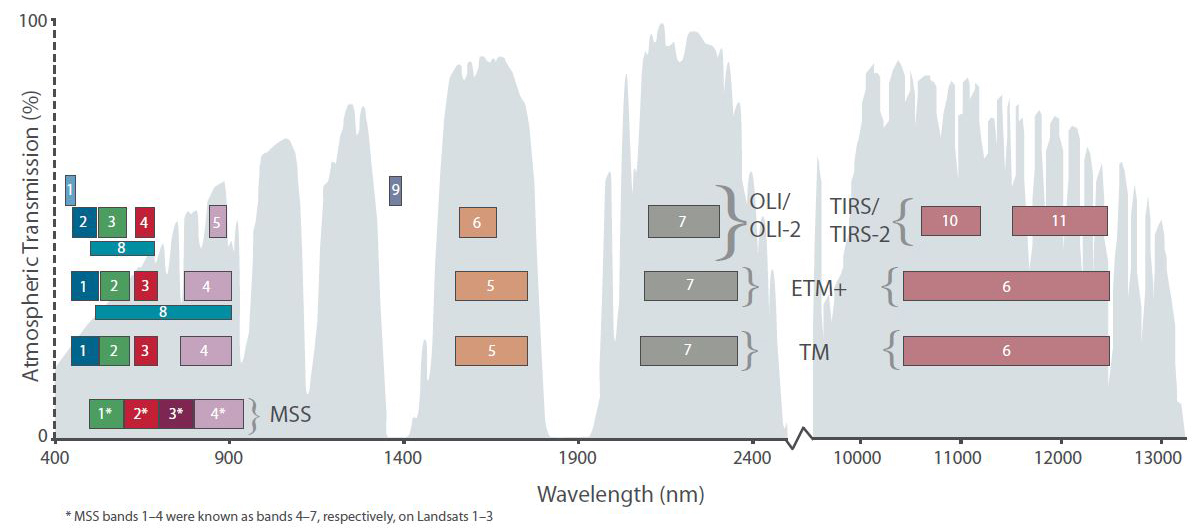
For comparison with previous Landsat missions: https://www.usgs.gov/faqs/what-are-band-designations-landsat-satellites?qt-news_science_products=0#qt-news_science_products
Dynamic Range
LS8 OLI provides 12-bit dynamic range, which improves signal to noise ratio.
Remember, each bit is a 0 or 1. We have 12 of them, so we have 2^12 (or 4096) unique combinations to represent brightness in the image.
Most data types on a computer are in multiples of bytes, which have 8 bits. For example, a typical RGB image of a cat face contains three 8-bit channels for red, green and blue values.
LS8 offers a considerable improvement over for the 8-bit dynamic range of Landsat 1-7. Improved signal to noise performance enables improved characterization of land cover state and condition.
We don’t have a convenient mechanism to store 12-bit data, so the LS8 images are stored as 16-bit unsigned integers (2^16 possible values, 0-65535)
The initial values (spanning 0-4095) are scaled across 55000 of the total 65535 brightness levels in the 16-bit images
Image Resolution - Ground Sample Distance (GSD)
Panchromatic (PAN) band (band number 8) has 15 m ground sample distance (GSD)
Multispectral (MS) bands are 30 m GSD
Thermal IR are 100 m GSD, but are often oversampled to match MS bands
Landsat-8 Data Products
The standard data products are “Level 1” images: they radiometrically corrected and orthorectified (terrain corrected) in the approprate UTM projection: https://www.usgs.gov/core-science-systems/nli/landsat/landsat-level-1-processing-details
For more sophisticated analysis, you typically want to use higher-level, calibrated/corrected products (“level 2” like surface reflectance values), often considered “Analysis Ready Data (ARD)”: https://www.usgs.gov/land-resources/nli/landsat/landsat-science-products
Information about Digital Number (DN), top of atmosphere (TOA) and surface reflectance (SR): https://www.l3harrisgeospatial.com/Learn/Blogs/Blog-Details/ArtMID/10198/ArticleID/16278/Digital-Number-Radiance-and-Reflectance
Top of Atmosphere reflectance
Formulas for conversion of DN to TOA: https://www.usgs.gov/landsat-missions/using-usgs-landsat-level-1-data-product
“Surface reflectance is the amount of light reflected by the surface of the Earth. It is a ratio of surface radiance to surface irradiance, and as such is unitless, with values between 0 and 1.”
“Surface reflectance (SR) improves comparison between multiple images over the same region by accounting for atmospheric effects such as aerosol scattering and thin clouds, which can help in the detection and characterization of Earth surface change. “
“Landsat 8 OLI Collection 1 Surface Reflectance are generated using the Land Surface Reflectance Code (LaSRC) (version 1.4.1), which makes use of the coastal aerosol band to perform aerosol inversion tests, uses auxiliary climate data from MODIS, and uses a unique radiative transfer model. (Vermote et al., 2016).”
Path/Row system
https://landsat.gsfc.nasa.gov/the-worldwide-reference-system/
Use descending for daytime imagery
Seattle and Mt. Rainier: path 46, row 27
LS8 Data availability
USGS/NASA hosts the official Landsat products:
This option is great for one-off interactive data searches, but can be clunky and requires a lot of manual steps. Both Google and Amazon mirror the entire USGS archive, and provide a much more efficient API (application programming interface) to access the data. This is especially important when you need to access 100s-1000s of images.
Google:
Amazon Web Services (AWS):
Finding cloud-free imagery
The process of identifying and downloading data has evolved considerably throughout the Landsat missions, and modern approaches use on-demand access to cloud-hosted archives, often without local downloads.
Interactive, manual approach: use EarthExplorer for visual queries: https://earthexplorer.usgs.gov/
Get the image ID
Can also directly download products from EarthExplorer, but pretty inefficient
Automated, programmatic approach: query archives from Python API or command-line, using SpatioTemporal Asset Catalog (STAC): https://landsat.stac.cloud
Other approaches: https://www.usgs.gov/landsat-missions/landsat-data-access
For now, let’s use some code to download some pre-identified images for WA state to the hub. Note that we could do all of this on the fly, but for experimentation and development, having a local copy of sample images will speed up reading.
import os
import urllib
import rasterio as rio
import rasterio.plot
Note that we can open an image directly from a url
(look Ma, no downloads!)
Let’s use the last url from our earlier download as a test
image_url = 'https://storage.googleapis.com/gcp-public-data-landsat/LC08/01/046/027/LC08_L1TP_046027_20180818_20180829_01_T1/LC08_L1TP_046027_20180818_20180829_01_T1_B10.TIF'
print(image_url)
with rio.open(image_url) as src:
    print(src.profile)
#Note that the dataset does not remain open!
src
with rio.open(image_url) as src:
    rio.plot.show(src)
Download Collection 1 Level 1 products (L1TP)
Terrain Precision Correction (L1TP) products
“Radiometrically calibrated and orthorectified using ground control points (GCPs) and digital elevation model (DEM) data to correct for relief displacement.”
“scaled and calibrated digital numbers (DN). The DN’s can be scaled to absolutely calibrated radiance or reflectance values using metadata which are distributed with the product. Formulas and information on converting Level-1 data to Top-of-Atmosphere radiance, reflectance, or brightness temperature can be found on the Using the USGS Landsat Level-1 Data Product page.”
See “Landsat Level-1 Processing Levels” https://www.usgs.gov/landsat-missions/landsat-collection-1
Hosted in Google Cloud with no costs for access: https://cloud.google.com/storage/docs/public-datasets/landsat
Transfer rates from Google Cloud should be excellent, as we’re running this Jupyterhub on a Google Cloud Platform (GCP) server
Notes about LS filenames: https://gisgeography.com/landsat-file-naming-convention/
#Create local directory to store images
imgdir = 'LS8_sample'
if not os.path.exists(imgdir):
    os.makedirs(imgdir)
#Use Google Cloud archive
base_url = 'https://storage.googleapis.com/gcp-public-data-landsat/LC08/01'

#Define Landsat path/row for Western Washington
path = 46
row = 27

#Pre-identified cloud-free Image IDs for this path/row
#Summer 2018
img_id1 = 'LC08_L1TP_046027_20180818_20180829_01_T1'
#Winter 2018
img_id2 = 'LC08_L1TP_046027_20181224_20190129_01_T1'

img_list = (img_id2, img_id1)
#img_list = (img_id1,)
#Loop through all selected images and all bands
for img in img_list:
    for b in range(1,12):
        #Generate the appropriate URL for the images we identified
        image_url =  '{0}/{1:03d}/{2:03d}/{3}/{3}_B{4}.TIF'.format(base_url, path, row, img, b)
        print(image_url)
        #Local filename
        out_fn = os.path.join(imgdir, os.path.split(image_url)[-1])
        #Check to see if file already exists
        if not os.path.exists(out_fn):
            print("Saving:", out_fn)
            #Download the file
            urllib.request.urlretrieve(image_url, out_fn)
Download Collection 2 (L2) products for Surface Reflectance and Surface Temperature
#Install necessary packages
#https://jakevdp.github.io/blog/2017/12/05/installing-python-packages-from-jupyter/
!pip install pystac planetary_computer
# Landsat-8 collection 2 from planetary computer
# https://planetarycomputer.microsoft.com/dataset/landsat-8-c2-l2#Example-Notebook

import pystac
from pystac_client import Client
import planetary_computer as pc
#Subset of relevant assets available for L2 surface reflectance products
asset_id_list = ['SR_B1', 'SR_B2', 'SR_B3', 'SR_B4', 'SR_B5', 'SR_B6', 'SR_B7', 'ST_B10', 'reduced_resolution_browse']
Catalog search with STAC
This should be used when you don’t know image IDs up front
Can search with spatial and temporal limits
Set cell type as raw for now, since we know Image IDs
#Open image on the fly
#with rasterio.open(signed_asset.href) as src:
#    print(src.profile)
Download assets for specific images
Construct url using known information
Using Microsoft Planetary Computer archive of Collection 2 Level 2 images
Requires a bit of a hack to “sign” urls without requiring login credentials - normally would authenticate with platform credentials (e.g., AWS) to access
#Using
base_url = 'https://landsateuwest.blob.core.windows.net/landsat-c2/level-2/standard/oli-tirs'
year = 2018
path = 46
row = 27
img_list = ['LC08_L2SP_046027_20180818_20200831_02_T1', 'LC08_L2SP_046027_20181224_20200829_02_T1']

#Quick test for evaluation of SR_B1 product
#img = img_list[0]
#b = 1
#t = 'SR'
#if b == 10:
#    t = 'ST'
#image_url =  f'{base_url}/{year}/{path:03d}/{row:03d}/{img}/{img}_{t}_B{b}.TIF'
#signed_asset = pc.sign_asset(pystac.asset.Asset(image_url))

#2021/045/031/LC08_L2SP_045031_20210107_20210307_02_T1/LC08_L2SP_045031_20210107_20210307_02_T1_SR_B2.TIF
#Loop through all selected images and all bands
for img in img_list:
    for asset_id in asset_id_list:
        #Generate the appropriate URL for the images we identified
        if asset_id == 'reduced_resolution_browse':
            image_url =  f'{base_url}/{year}/{path:03d}/{row:03d}/{img}/{img}_thumb_large.jpeg'
        else:
            image_url =  f'{base_url}/{year}/{path:03d}/{row:03d}/{img}/{img}_{asset_id}.TIF'
        print(image_url)
        #Local filename
        out_fn = os.path.join(imgdir, os.path.split(image_url)[-1])
        #Check to see if file already exists
        if not os.path.exists(out_fn):
            signed_asset = pc.sign_asset(pystac.asset.Asset(image_url))
            print("Saving:", out_fn)
            #Download the file
            urllib.request.urlretrieve(signed_asset.href, out_fn)
Do a quick ls -lh on the local image directory
Note relative file sizes for the different bands of each image
B8 vs B3 vs. B10
Revisit the chart above - does this make sense for resolution of these bands?
!ls -lh $imgdir
Use gdalinfo command to get some basic information about one of the files
Review output with your neighbor/group
🤔 Talk about what each line means, if there is something you don’t understand, ask! Or look it up together!
sample_fn = os.path.join(imgdir, img+'_ST_B10.TIF')
print(sample_fn)
!gdalinfo $sample_fn