
Demo: Raster fundamentals, Rasterio, Band Math with Arrays
Contents
Demo: Raster fundamentals, Rasterio, Band Math with Arrays
UW Geospatial Data Analysis
CEE498/CEWA599
David Shean
Introduction
See reading assignment 05_Raster1_GDAL_rasterio_LS8_prep
What is a raster?
Raster data sources
Satellite imagery
Gridded model output
Interpolated vector data
Raster fundamentals
Interactive discussion during demo
Dimensions (width [columns] and height [rows] in pixels)
CRS (coordinate system)
Extent (bounds)
Resolution (pixel size)
Data type (bit depth)
Number of bands
NoData values
GDAL (Geospatial Data Abstraction Library) and Rasterio
GDAL is a powerful and mature library for reading, writing and warping raster datasets, written in C++ with bindings to other languages. There are a variety of geospatial libraries available on the python package index, and almost all of them depend on GDAL. One such python library developed and supported by Mapbox, rasterio, builds on top of GDAL’s many features, but provides a more pythonic interface and supports many of the features and formats that GDAL supports. Both GDAL and rasterio are constantly being updated and improved.
Raster formats
GeoTiff is most common
GDAL is the foundation - drivers for hundreds of formats
CRS and Projections
Most often UTM
PROJ is the foundation (as with GeoPandas)
Raster transformations
Sensor to raster image
Simple example of a 2D CCD/CMOS detector in a simple camera (e.g., Planet Dove)
Snapshot of the Earth
Sensor model allows you to relate each pixel in the image to a geographic location on the ground
Existing DEM to produce an orthorectified image in some projected coordinate system
That’s where we start
Raster image (lines, samples) to projected coordinates
Need a way to relate from pixel coordinates (2D rectangular image on your screen) to real-world coordinates (projected)
Pixel coordinates: image width, height in units of pixels, starting at (0,0)
Real-world coordiantes: projected coordinate system (e.g., UTM 10N), units of meters
Origin is usually upper left corner of upper left pixel
Careful about this - you will definitely run into this problem at some point
Often your grid may be shifted by a half a pixel in x and y
Negative y cell size - what’s up with that?
GDAL/ESRI affine
rasterio affine
Multiply affine by raster indices to get projected coordinates
Rasterio dataset
xyandindexmethods
Basic raster structure
Dataset
Bands
Often just 1 band, sometimes multiple bands (new axis)
Read band to get underlying 2D array data
Handling missing data (nodata) - masked arrays vs. np.nan
Overviews
3D array to create composites from multispectral bands
Can dstack 2D arrays
Misc
Be careful with large rasters, esp float - don’t load into memory
Read in a window or every nth pixel when prototyping. Only read in full res when ready.
Try to avoid creating many copies of arrays
GDAL command line utilities
Learn these: https://gdal.org/programs/index.html
gdalinfo
gdal_translate
gdalwarp
gdaladdo
Items to discuss
Use standard creation options (co)
TILED=YES
COMPRESS=LZW
BIGTIFF=IF_SAFER
Resampling algorithms
Default is nearest
Often bilinear or bicubic is a better choice for reprojecting, upsampling, downsampling
Demo
https://automating-gis-processes.github.io/site/notebooks/Raster/reading-raster.html
pwd
'/home/jovyan/jupyterbook/book/modules/05_Raster1_GDAL_rasterio_LS8'
import os
import numpy as np
import matplotlib.pyplot as plt

import rasterio as rio
import rasterio.plot
from osgeo import gdal

#Useful package to add dynamic scalebar to matplotlib images
from matplotlib_scalebar.scalebar import ScaleBar
#We want to use interactive plotting for zoom/pan and live coordinate display
#matplotlib widget
%matplotlib inline
#Create local directory to store images
imgdir = 'LS8_sample'
#Summer 2018
img_id1 = 'LC08_L1TP_046027_20180818_20180829_01_T1'
#Winter 2018
img_id2 = 'LC08_L1TP_046027_20181224_20190129_01_T1'

img = img_id1
Specify filenames for specific bands used for later examples
#Specify filenames for different bands we will need for the lab
#Check table from background section to see wavelengths of each band number

#Red
r_fn = os.path.join(imgdir, img+'_B4.TIF')
#Green
g_fn = os.path.join(imgdir, img+'_B3.TIF')
#Blue
b_fn = os.path.join(imgdir, img+'_B2.TIF')
#Near-Infrared
nir_fn = os.path.join(imgdir, img+'_B5.TIF')
#Shortwave-Infrared
swir_fn = os.path.join(imgdir, img+'_B6.TIF')
#Panchromatic
p_fn = os.path.join(imgdir, img+'_B8.TIF')
#Specify filenames for different bands we will need for the lab
#Check table from background section to see wavelengths of each band number
tir_fn = os.path.join(imgdir, img+'_B10.TIF')
print(tir_fn)
LS8_sample/LC08_L1TP_046027_20180818_20180829_01_T1_B10.TIF
#Using Collection 2 L2 products (calibrated surface reflectance, temperature)
#img = 'LC08_L2SP_046027_20180818_20200831_02_T1'
#tir_fn = os.path.join(imgdir, img+'_ST_B10.TIF')
!gdalinfo $tir_fn
Driver: GTiff/GeoTIFF
Files: LS8_sample/LC08_L1TP_046027_20180818_20180829_01_T1_B10.TIF
Size is 7781, 7881
Coordinate System is:
PROJCRS["WGS 84 / UTM zone 10N",
    BASEGEOGCRS["WGS 84",
        DATUM["World Geodetic System 1984",
            ELLIPSOID["WGS 84",6378137,298.257223563,
                LENGTHUNIT["metre",1]]],
        PRIMEM["Greenwich",0,
            ANGLEUNIT["degree",0.0174532925199433]],
        ID["EPSG",4326]],
    CONVERSION["UTM zone 10N",
        METHOD["Transverse Mercator",
            ID["EPSG",9807]],
        PARAMETER["Latitude of natural origin",0,
            ANGLEUNIT["degree",0.0174532925199433],
            ID["EPSG",8801]],
        PARAMETER["Longitude of natural origin",-123,
            ANGLEUNIT["degree",0.0174532925199433],
            ID["EPSG",8802]],
        PARAMETER["Scale factor at natural origin",0.9996,
            SCALEUNIT["unity",1],
            ID["EPSG",8805]],
        PARAMETER["False easting",500000,
            LENGTHUNIT["metre",1],
            ID["EPSG",8806]],
        PARAMETER["False northing",0,
            LENGTHUNIT["metre",1],
            ID["EPSG",8807]]],
    CS[Cartesian,2],
        AXIS["(E)",east,
            ORDER[1],
            LENGTHUNIT["metre",1]],
        AXIS["(N)",north,
            ORDER[2],
            LENGTHUNIT["metre",1]],
    USAGE[
        SCOPE["Engineering survey, topographic mapping."],
        AREA["Between 126°W and 120°W, northern hemisphere between equator and 84°N, onshore and offshore. Canada - British Columbia (BC); Northwest Territories (NWT); Nunavut; Yukon. United States (USA) - Alaska (AK)."],
        BBOX[0,-126,84,-120]],
    ID["EPSG",32610]]
Data axis to CRS axis mapping: 1,2
Origin = (473385.000000000000000,5373315.000000000000000)
Pixel Size = (30.000000000000000,-30.000000000000000)
Metadata:
  AREA_OR_POINT=Point
Image Structure Metadata:
  COMPRESSION=LZW
  INTERLEAVE=BAND
  PREDICTOR=2
Corner Coordinates:
Upper Left  (  473385.000, 5373315.000) (123d21'37.35"W, 48d30'44.59"N)
Lower Left  (  473385.000, 5136885.000) (123d20'46.06"W, 46d23' 6.06"N)
Upper Right (  706815.000, 5373315.000) (120d12' 4.97"W, 48d28'44.09"N)
Lower Right (  706815.000, 5136885.000) (120d18'42.66"W, 46d21'14.16"N)
Center      (  590100.000, 5255100.000) (121d48'17.82"W, 47d26'35.21"N)
Band 1 Block=256x256 Type=UInt16, ColorInterp=Gray
Rasterio basics
We’ll stick with rasterio for most of our Python raster analysis
Use a Python with construct to cleanly open, inspect, and close the file directly from the url
The Python
withconstruct may be new, or maybe you used it during Lab02 when opening a text file for reading/writing.It is “used in exception handling to make the code cleaner and much more readable. It simplifies the management of common resources like file streams.”
Enables more elegant file opening/closing and handling errors (like missing files)
Let’s use the
with rio.open()approach to print out the rasterio dataset profile, without actually reading the underlying image dataWe will temporarily store the rasterio dataset with variable name
src(short for “source”)
with rio.open(tir_fn) as src:
    print(src.profile)
{'driver': 'GTiff', 'dtype': 'uint16', 'nodata': None, 'width': 7781, 'height': 7881, 'count': 1, 'crs': CRS.from_epsg(32610), 'transform': Affine(30.0, 0.0, 473385.0,
       0.0, -30.0, 5373315.0), 'blockxsize': 256, 'blockysize': 256, 'tiled': True, 'compress': 'lzw', 'interleave': 'band'}
Can also open dataset with rasterio for persistence and interactive access
This is likely a better option as you’re learning, as you can access the opened dataset and arrays you’ve already read in other cells
Remember to close the rasterio dataset when no longer needed!
src = rio.open(tir_fn)
type(src)
rasterio.io.DatasetReader
src.profile
{'driver': 'GTiff', 'dtype': 'uint16', 'nodata': None, 'width': 7781, 'height': 7881, 'count': 1, 'crs': CRS.from_epsg(32610), 'transform': Affine(30.0, 0.0, 473385.0,
       0.0, -30.0, 5373315.0), 'blockxsize': 256, 'blockysize': 256, 'tiled': True, 'compress': 'lzw', 'interleave': 'band'}
src.meta
{'driver': 'GTiff',
 'dtype': 'uint16',
 'nodata': None,
 'width': 7781,
 'height': 7881,
 'count': 1,
 'crs': CRS.from_epsg(32610),
 'transform': Affine(30.0, 0.0, 473385.0,
        0.0, -30.0, 5373315.0)}
src.crs
CRS.from_epsg(32610)
Read the array
#src.read?
#Note memory usage before and after reading
%time
a = src.read(1)
CPU times: user 3 µs, sys: 1e+03 ns, total: 4 µs
Wall time: 7.15 µs
a
array([[0, 0, 0, ..., 0, 0, 0],
       [0, 0, 0, ..., 0, 0, 0],
       [0, 0, 0, ..., 0, 0, 0],
       ...,
       [0, 0, 0, ..., 0, 0, 0],
       [0, 0, 0, ..., 0, 0, 0],
       [0, 0, 0, ..., 0, 0, 0]], dtype=uint16)
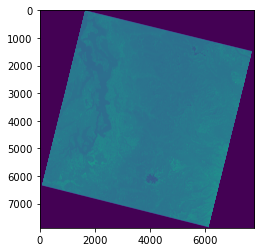
Inspect the array
a.shape
(7881, 7781)
a.size
61322061
a.dtype
dtype('uint16')
a.min()
0
a.max()
65535
2**16
65536
a
array([[0, 0, 0, ..., 0, 0, 0],
       [0, 0, 0, ..., 0, 0, 0],
       [0, 0, 0, ..., 0, 0, 0],
       ...,
       [0, 0, 0, ..., 0, 0, 0],
       [0, 0, 0, ..., 0, 0, 0],
       [0, 0, 0, ..., 0, 0, 0]], dtype=uint16)
a.ravel()
array([0, 0, 0, ..., 0, 0, 0], dtype=uint16)
f, ax = plt.subplots()
plt.hist(a.ravel(), bins=128);

Image bit depth
Number of possible intensity values
#Landsat-8 OLI is 12-bit sensor
2**12
4096
2**16
65536
Use a masked array to handle nodata
src.nodata
src.nodatavals
(None,)
#Normally, rasterio handles on the fly
#Unfortunately nodata is not set properly in the Collection 1 GeoTiff on Google Cloud
a = src.read(1, masked=True)
a
masked_array(
  data=[[0, 0, 0, ..., 0, 0, 0],
        [0, 0, 0, ..., 0, 0, 0],
        [0, 0, 0, ..., 0, 0, 0],
        ...,
        [0, 0, 0, ..., 0, 0, 0],
        [0, 0, 0, ..., 0, 0, 0],
        [0, 0, 0, ..., 0, 0, 0]],
  mask=False,
  fill_value=999999,
  dtype=uint16)
np.ma.masked_equal?
Signature: np.ma.masked_equal(x, value, copy=True)
Docstring:
Mask an array where equal to a given value.

This function is a shortcut to ``masked_where``, with
`condition` = (x == value).  For floating point arrays,
consider using ``masked_values(x, value)``.

See Also
--------
masked_where : Mask where a condition is met.
masked_values : Mask using floating point equality.

Examples
--------
>>> import numpy.ma as ma
>>> a = np.arange(4)
>>> a
array([0, 1, 2, 3])
>>> ma.masked_equal(a, 2)
masked_array(data=[0, 1, --, 3],
             mask=[False, False,  True, False],
       fill_value=2)
File:      /srv/conda/envs/notebook/lib/python3.9/site-packages/numpy/ma/core.py
Type:      function
np.ma.masked_equal(a, 0)
masked_array(
  data=[[--, --, --, ..., --, --, --],
        [--, --, --, ..., --, --, --],
        [--, --, --, ..., --, --, --],
        ...,
        [--, --, --, ..., --, --, --],
        [--, --, --, ..., --, --, --],
        [--, --, --, ..., --, --, --]],
  mask=[[ True,  True,  True, ...,  True,  True,  True],
        [ True,  True,  True, ...,  True,  True,  True],
        [ True,  True,  True, ...,  True,  True,  True],
        ...,
        [ True,  True,  True, ...,  True,  True,  True],
        [ True,  True,  True, ...,  True,  True,  True],
        [ True,  True,  True, ...,  True,  True,  True]],
  fill_value=0,
  dtype=uint16)
a = np.ma.masked_equal(a, 0)
f, ax = plt.subplots()
plt.imshow(a);

f, ax = plt.subplots()
plt.hist(a.ravel(), bins=128);

Bounds and extent
#This is rasterio bounds object - note labels like dictionary keys and values
src.bounds
BoundingBox(left=473385.0, bottom=5136885.0, right=706815.0, top=5373315.0)
#This is matplotlib extent
full_extent = [src.bounds.left, src.bounds.right, src.bounds.bottom, src.bounds.top]
print(full_extent)
[473385.0, 706815.0, 5136885.0, 5373315.0]
#rasterio convenience function
full_extent = rio.plot.plotting_extent(src)
print(full_extent)
(473385.0, 706815.0, 5136885.0, 5373315.0)
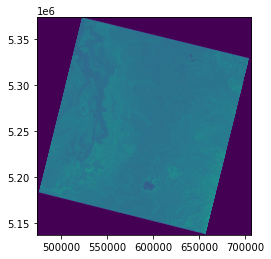
Plot the image with imshow, but now pass in this extent as an argument
Note how the axes coordinates change
These should now be meters in the UTM 10N coordinate system of the projected image!
f, axa = plt.subplots(1,2, figsize=(10,6))
axa[0].imshow(a, cmap='gray') #vmin=0, vmax=1
axa[0].set_title("Array coordinates")
axa[1].imshow(a, extent=full_extent, cmap='gray') #vmin=0, vmax=1
axa[1].set_title("Projected coordinates")
plt.tight_layout()

Raster transform
How does rasterio know the bounds of the array?
Inspect the dataset
transformattributeYou may have encountered an ESRI “world file” or GDAL geotransform before. This is the same idea, but Rasterio’s model uses traditional affine transform.
Review this: https://rasterio.readthedocs.io/en/stable/topics/georeferencing.html?highlight=affine#coordinate-transformation
src.transform
Affine(30.0, 0.0, 473385.0,
       0.0, -30.0, 5373315.0)
#These are (x,y) for corners in pixel space
#A bit confusing due to (row,col) of shape, which is (y,x)

#Upper left
ul = (0, 0)
#Lower right
lr = (a.shape[1], a.shape[0])
#Transform upper left corner
ul_proj = src.transform * ul
ul_proj
(473385.0, 5373315.0)
#Transform lower right corner
lr_proj = src.transform * lr
lr_proj
(706815.0, 5136885.0)
wh_km = np.abs(np.array(ul_proj) - np.array(lr_proj))/1000
wh_km
print('Total width: %0.2f km\nTotal height: %0.2f km' % (wh_km[0], wh_km[1]))
Total width: 233.43 km
Total height: 236.43 km
Raster and array sampling
Use helper functions
xyandsample
#Array coordinates
c = (3512, 3512)
a[3000,3000]
27559
#Get value at coordinates using array indexing
a[c[0], c[1]]
25468
#src.xy?
#Note use of argument expansion here (*c) so we don't have to pass individual c[0] and c[1] values
x,y = src.xy(*c)
print(x,y)
578760.0 5267940.0
#src.sample?
src.sample(x, y)
<generator object sample_gen at 0x7f44e0518820>
#Doesn't work
#list(src.sample(x, y))
src.sample([(x, y),])
<generator object sample_gen at 0x7f44e0491820>
#Pass in a list, and evaluate the generator
list(src.sample([(x, y),]))
[array([25468], dtype=uint16)]
Windowing and indexing
chunk = a[3000:4024,3000:4024]
chunk
masked_array(
  data=[[27559, 27638, 27596, ..., 24997, 25006, 25020],
        [27099, 27126, 27077, ..., 24994, 24996, 25005],
        [26799, 26776, 26735, ..., 24984, 24983, 24987],
        ...,
        [28986, 29076, 29005, ..., 24825, 24819, 24818],
        [29032, 29157, 29110, ..., 24823, 24811, 24806],
        [28960, 29155, 29129, ..., 24823, 24809, 24799]],
  mask=[[False, False, False, ..., False, False, False],
        [False, False, False, ..., False, False, False],
        [False, False, False, ..., False, False, False],
        ...,
        [False, False, False, ..., False, False, False],
        [False, False, False, ..., False, False, False],
        [False, False, False, ..., False, False, False]],
  fill_value=0,
  dtype=uint16)
f, ax = plt.subplots()
plt.imshow(chunk)
<matplotlib.image.AxesImage at 0x7f44e076ab20>

Store a reduced resolution view (1 pixel for every 100 original pixels)
asub = a[::10, ::10]
asub
masked_array(
  data=[[--, --, --, ..., --, --, --],
        [--, --, --, ..., --, --, --],
        [--, --, --, ..., --, --, --],
        ...,
        [--, --, --, ..., --, --, --],
        [--, --, --, ..., --, --, --],
        [--, --, --, ..., --, --, --]],
  mask=[[ True,  True,  True, ...,  True,  True,  True],
        [ True,  True,  True, ...,  True,  True,  True],
        [ True,  True,  True, ...,  True,  True,  True],
        ...,
        [ True,  True,  True, ...,  True,  True,  True],
        [ True,  True,  True, ...,  True,  True,  True],
        [ True,  True,  True, ...,  True,  True,  True]],
  fill_value=0,
  dtype=uint16)
asub.shape
(789, 779)
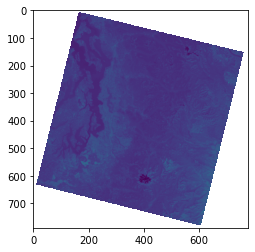
#Every 10th pixel - great strategy for quick visualization during development/exploration
f, ax = plt.subplots()
plt.imshow(asub);
Raster math
#%matplotlib widget
#Remember to use compressed for historgrams with 2D masked arrays
f, ax = plt.subplots()
plt.hist(asub.compressed(), bins=128);

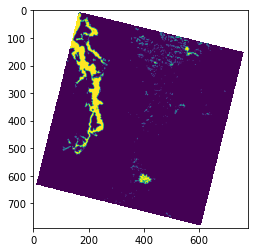
asub < 24000
masked_array(
  data=[[--, --, --, ..., --, --, --],
        [--, --, --, ..., --, --, --],
        [--, --, --, ..., --, --, --],
        ...,
        [--, --, --, ..., --, --, --],
        [--, --, --, ..., --, --, --],
        [--, --, --, ..., --, --, --]],
  mask=[[ True,  True,  True, ...,  True,  True,  True],
        [ True,  True,  True, ...,  True,  True,  True],
        [ True,  True,  True, ...,  True,  True,  True],
        ...,
        [ True,  True,  True, ...,  True,  True,  True],
        [ True,  True,  True, ...,  True,  True,  True],
        [ True,  True,  True, ...,  True,  True,  True]],
  fill_value=0)
f, ax = plt.subplots()
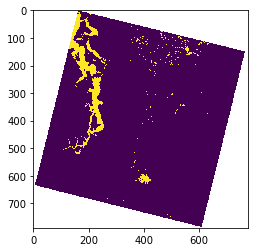
plt.imshow(asub < 24000);
plt.imshow(asub < 24000, interpolation='none');
Calculating area
(asub < 24000).sum()
19903
src.res
(30.0, 30.0)
#Delete array from memory
asub = None
a = None
#Close the rasterio dataset
src.close()
GDAL Python API basics
I’m including this for reference
It’s not that complicated, even though rasterio is the more popular option for Python these days (partly because of much better documentation)
https://github.com/OSGeo/gdal/tree/master/gdal/swig/python/samples
#Open the green band GeoTiff as GDAL Dataset object
ds = gdal.Open(tir_fn)
#Get the raster band
gdal_b = ds.GetRasterBand(1)
#Read into array
a = gdal_b.ReadAsArray()
#Inspect the array
a
array([[0, 0, 0, ..., 0, 0, 0],
       [0, 0, 0, ..., 0, 0, 0],
       [0, 0, 0, ..., 0, 0, 0],
       ...,
       [0, 0, 0, ..., 0, 0, 0],
       [0, 0, 0, ..., 0, 0, 0],
       [0, 0, 0, ..., 0, 0, 0]], dtype=uint16)
#View the array
f, ax = plt.subplots()
ax.imshow(a);

#Set array to None (frees up RAM) and close GDAL dataset
a = None
ds = None