
Excercises 1
Notebook #1: Intro and Global Climatology
UW Geospatial Data Analysis
CEE498/CEWA599
David Shean
Objectives
Introduce xarray data model for N-d array analysis
Practice basic N-d array slicing, grouping and aggregation
Explore global and local climate reanalysis data
Discussion
Can use these as input variables for analysis in your projects
correlating lake area with surface T evolution
Introduction
This week we are going to do some basic analysis of climate reanalysis data.
We will use a few different products from the state-of-the-art ERA5 reanalysis, which currently span 1979-present with hourly timestep at 1/4° grid resolution (~30 km). Future releases will extent the record back to 1950.
We will use xarray to open, combine, analyze and plot the data.
xarray
Take a moment to review this high-level introduction:
“Xarray introduces labels in the form of dimensions, coordinates and attributes on top of raw NumPy-like multidimensional arrays, which allows for a more intuitive, more concise, and less error-prone developer experience.”
It’s also an excellent choice for working with large datasets, as it uses lazy evaluation and parallel processing with Dask: http://xarray.pydata.org/en/stable/dask.html
So, what’s an nD array? (https://docs.scipy.org/doc/numpy-1.13.0/reference/arrays.ndarray.html) You’ve been using them all quarter, but mostly 1D and 2D NumPy arrays.
As with many of the packages we’ve covered this quarter, vocabulary can be one of the biggest blocks to learning. Let’s discuss.
DataSet overview
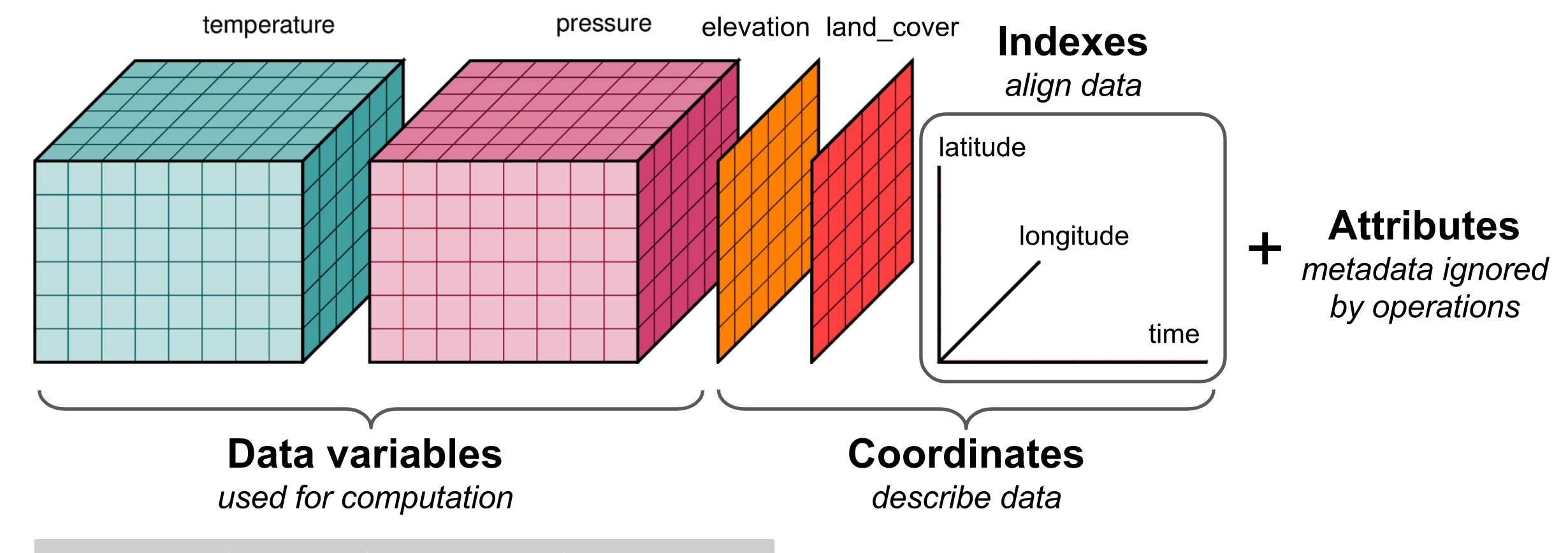 (http://xarray.pydata.org/en/latest/data-structures.html#dataset)
Comparison with Pandas
Pandas is very good at handling 2D tabular datasets (e.g., csv with columns and rows, time series of met station variables from a single station [T, precip, etc]).
“If your data fits nicely into a pandas DataFrame then you’re better off using one of the more developed tools there.” (http://xarray.pydata.org/en/v0.7.2/plotting.html)
“pandas excels at working with tabular data. That suffices for many statistical analyses, but physical scientists rely on N-dimensional arrays – which is where xarray comes in.” (http://xarray.pydata.org/en/stable/why-xarray.html#goals-and-aspirations)
xarray extends the Pandas functionality to support 3+ dimensions (e.g., time series of 2D rasters).
xarray is to Pandas…
xarray DataArray : Pandas DataSeries
xarray DataSet : Pandas DataFrame
DataArray
Four essential pieces:
values: a numpy.ndarrays with actual data values (e.g., (‘t2m’, ‘tp’)dims: dimension names for each axis (e.g., (‘lon’, ‘lat’, ‘time’))coords: a dict-like container of arrays (coordinates) that label each point (e.g., 1-dimensional arrays of numbers, datetime objects or strings)attrs: an OrderedDict containing additional metadata (attributes)
Dataset
Essentially, a collection of DataArrays (like a dictionary of DataArrays)
http://xarray.pydata.org/en/latest/data-structures.html#dataset
Notes:
One value in one of the contained arrays (say a single temperature measurement) usually has multiple coordinates (‘lon’, ‘lat’, ‘time’)
Essential xarray examples and references
Indexing and selection: http://xarray.pydata.org/en/stable/index.html
Visualization examples: http://xarray.pydata.org/en/stable/examples/visualization_gallery.html
Time-series analysis: http://xarray.pydata.org/en/stable/time-series.html
ERA5 Reanalysis Data
ERA5 = “ECMWF ReAnalysis 5”
ECMWF = “European Centre for Medium-Range Weather Forecasts”
“ERA5 provides hourly estimates of a large number of atmospheric, land and oceanic climate variables. The data cover the Earth on a 30km grid and resolve the atmosphere using 137 levels from the surface up to a height of 80km.”
“ERA5 combines vast amounts of historical observations into global estimates using advanced modelling and data assimilation systems.”
Variables
Hundreds of output variables for each hourly timestep. See a list of all of the available variables:
Resolution
The ERA5 HRES (High Resolution) data has a native resolution of 0.28125 degrees (31km)
#For one variable, total number of grid cells for full 70 year record at hourly resolution
360*180*4*4*137*24*365.25*70
87159566592000.0
Data Availability
For this lab, I prepared some sample datasets.
Please run the 09_NDarrays_xarray_ERA5_Part0_download.ipynb notebook to download and prepare these files!.
From CDS (Climate Data Store)
For future reference, you can access the ERA5 data directly! The CDS API allows you to request subsets of ERA5 products for desired spatial extent, time periods, time intervals, etc.:
Some commonly used products are also available on Amazon S3
OK, let’s get started with the data analysis already!
import os
from glob import glob
import numpy as np
import xarray as xr
import pandas as pd
import geopandas as gpd
import cartopy.crs as ccrs
import matplotlib.pyplot as plt
Get the WA state outline
#states_url = 'http://eric.clst.org/assets/wiki/uploads/Stuff/gz_2010_us_040_00_5m.json'
states_url = 'http://eric.clst.org/assets/wiki/uploads/Stuff/gz_2010_us_040_00_500k.json'
states_gdf = gpd.read_file(states_url)
wa_state = states_gdf.loc[states_gdf['NAME'] == 'Washington']
wa_state.plot();
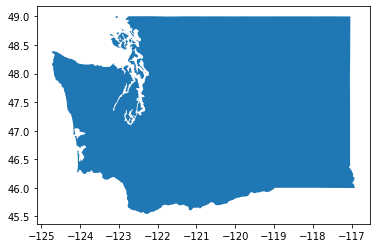
wa_geom = wa_state.iloc[0].geometry
wa_geom

wa_bounds = wa_state.total_bounds
wa_bounds
array([-124.733174, 45.543541, -116.915989, 49.002494])
def myround(x, base=0.25):
return base * np.round(x/base)
def roundbounds(bounds, base=0.25):
bounds_floor = np.floor(wa_bounds/base)*base
bounds_ceil = np.ceil(wa_bounds/base)*base
return [bounds_floor[0], bounds_floor[1], bounds_ceil[2], bounds_ceil[3]]
wa_rbounds = roundbounds(wa_bounds)
wa_rbounds
[-124.75, 45.5, -116.75, 49.25]
Part 1: Global climatology
Monthly temperature from 1979-2021
Two datasets are provided:
Climatology - long-term mean monthly values ofrom 1979-2021 (12 grids)
Anomaly - monthly difference from long-term monthly mean (505 grids from 1979-2021)
https://cds.climate.copernicus.eu/cdsapp#!/dataset/ecv-for-climate-change?tab=overview
%pwd
'/home/jovyan/gda_course_2021_solutions/modules/09_NDarrays_xarray_ERA5'
Open the processed global monthly temperature anomaly and climatology NetCDF files
See relevant doc on opening and writing files: http://xarray.pydata.org/en/stable/io.html
Note that processing and saving the anomalies could take some time, as you’re reading in 480 files and saving a large nc file
Take a moment to review the steps in the
grib2ncfunction of the download notebook, and review the io doc for xarrayNote the
open_datasetandconcatfunctions
out_fn = 'era5_data/ecv-for-climate-change/climatology_0.25g_ea_2t.nc'
t_clim_ds = xr.open_dataset(out_fn)
out_fn = 'era5_data/ecv-for-climate-change/1month_anomaly_Global_ea_2t.nc'
t_anom_ds = xr.open_dataset(out_fn)
Inspect the DataSets
Discuss with your neighbor
Review the output of the
info()methodNote the number of time entries in each DataSet
What are the min and max longitude, min and max latitude
Note: The timestamp listed in the climatology dataset for each month is arbitrarily listed as 2018 (e.g., ‘2018-01-01’)
Remember these are mean values for each month of the year (12 total) across the entire 1979-2021 period
print info for the ‘t2m’ DataArray (temperature 2 m above ground)
t_clim_ds
<xarray.Dataset>
Dimensions: (latitude: 721, longitude: 1440, time: 12)
Coordinates:
* time (time) datetime64[ns] 1981-01-01 1981-02-01 ... 1981-12-01
* latitude (latitude) float64 90.0 89.75 89.5 89.25 ... -89.5 -89.75 -90.0
* longitude (longitude) float64 0.0 0.25 0.5 0.75 ... 359.0 359.2 359.5 359.8
Data variables:
t2m (time, latitude, longitude) float32 ...
Attributes:
GRIB_edition: 1
GRIB_centre: ecmf
GRIB_centreDescription: European Centre for Medium-Range Weather Forecasts
GRIB_subCentre: 0
Conventions: CF-1.7
institution: European Centre for Medium-Range Weather Forecasts
history: 2021-03-05T18:48:23 GRIB to CDM+CF via cfgrib-0....- latitude: 721
- longitude: 1440
- time: 12
- time(time)datetime64[ns]1981-01-01 ... 1981-12-01
- long_name :
- initial time of forecast
- standard_name :
- forecast_reference_time
array(['1981-01-01T00:00:00.000000000', '1981-02-01T00:00:00.000000000', '1981-03-01T00:00:00.000000000', '1981-04-01T00:00:00.000000000', '1981-05-01T00:00:00.000000000', '1981-06-01T00:00:00.000000000', '1981-07-01T00:00:00.000000000', '1981-08-01T00:00:00.000000000', '1981-09-01T00:00:00.000000000', '1981-10-01T00:00:00.000000000', '1981-11-01T00:00:00.000000000', '1981-12-01T00:00:00.000000000'], dtype='datetime64[ns]') - latitude(latitude)float6490.0 89.75 89.5 ... -89.75 -90.0
- units :
- degrees_north
- standard_name :
- latitude
- long_name :
- latitude
- stored_direction :
- decreasing
array([ 90. , 89.75, 89.5 , ..., -89.5 , -89.75, -90. ])
- longitude(longitude)float640.0 0.25 0.5 ... 359.2 359.5 359.8
- units :
- degrees_east
- standard_name :
- longitude
- long_name :
- longitude
array([0.0000e+00, 2.5000e-01, 5.0000e-01, ..., 3.5925e+02, 3.5950e+02, 3.5975e+02])
- t2m(time, latitude, longitude)float32...
- GRIB_paramId :
- 167
- GRIB_shortName :
- 2t
- GRIB_units :
- K
- GRIB_name :
- 2 metre temperature
- GRIB_cfVarName :
- t2m
- GRIB_dataType :
- an
- GRIB_missingValue :
- 9999
- GRIB_numberOfPoints :
- 1038240
- GRIB_totalNumber :
- 0
- GRIB_typeOfLevel :
- surface
- GRIB_NV :
- 0
- GRIB_stepUnits :
- 1
- GRIB_stepType :
- avgua
- GRIB_gridType :
- regular_ll
- GRIB_gridDefinitionDescription :
- Latitude/Longitude Grid
- GRIB_Nx :
- 1440
- GRIB_iDirectionIncrementInDegrees :
- 0.25
- GRIB_iScansNegatively :
- 0
- GRIB_longitudeOfFirstGridPointInDegrees :
- 0.0
- GRIB_longitudeOfLastGridPointInDegrees :
- 359.75
- GRIB_Ny :
- 721
- GRIB_jDirectionIncrementInDegrees :
- 0.25
- GRIB_jPointsAreConsecutive :
- 0
- GRIB_jScansPositively :
- 0
- GRIB_latitudeOfFirstGridPointInDegrees :
- 90.0
- GRIB_latitudeOfLastGridPointInDegrees :
- -90.0
- long_name :
- 2 metre temperature
- units :
- K
- coordinates :
- number time step surface latitude longitude valid_time
[12458880 values with dtype=float32]
- GRIB_edition :
- 1
- GRIB_centre :
- ecmf
- GRIB_centreDescription :
- European Centre for Medium-Range Weather Forecasts
- GRIB_subCentre :
- 0
- Conventions :
- CF-1.7
- institution :
- European Centre for Medium-Range Weather Forecasts
- history :
- 2021-03-05T18:48:23 GRIB to CDM+CF via cfgrib-0.9.8.5/ecCodes-2.20.0 with {"source": "/home/jovyan/gda_course_2021_solutions/modules/09_NDarrays_xarray_ERA5/era5_data/ecv-for-climate-change/climatology_0.25g_ea_2t_01_19812010_v02.grib", "filter_by_keys": {}, "encode_cf": ["parameter", "time", "geography", "vertical"]}
t_anom_ds
<xarray.Dataset>
Dimensions: (latitude: 721, longitude: 1440, time: 505)
Coordinates:
* time (time) datetime64[ns] 1979-01-01 1979-02-01 ... 2021-01-01
* latitude (latitude) float64 90.0 89.75 89.5 89.25 ... -89.5 -89.75 -90.0
* longitude (longitude) float64 0.0 0.25 0.5 0.75 ... 359.0 359.2 359.5 359.8
Data variables:
t2m (time, latitude, longitude) float32 ...
Attributes:
GRIB_edition: 1
GRIB_centre: ecmf
GRIB_centreDescription: European Centre for Medium-Range Weather Forecasts
GRIB_subCentre: 0
Conventions: CF-1.7
institution: European Centre for Medium-Range Weather Forecasts
history: 2021-03-05T18:49:04 GRIB to CDM+CF via cfgrib-0....- latitude: 721
- longitude: 1440
- time: 505
- time(time)datetime64[ns]1979-01-01 ... 2021-01-01
- long_name :
- initial time of forecast
- standard_name :
- forecast_reference_time
array(['1979-01-01T00:00:00.000000000', '1979-02-01T00:00:00.000000000', '1979-03-01T00:00:00.000000000', ..., '2020-11-01T00:00:00.000000000', '2020-12-01T00:00:00.000000000', '2021-01-01T00:00:00.000000000'], dtype='datetime64[ns]') - latitude(latitude)float6490.0 89.75 89.5 ... -89.75 -90.0
- units :
- degrees_north
- standard_name :
- latitude
- long_name :
- latitude
- stored_direction :
- decreasing
array([ 90. , 89.75, 89.5 , ..., -89.5 , -89.75, -90. ])
- longitude(longitude)float640.0 0.25 0.5 ... 359.2 359.5 359.8
- units :
- degrees_east
- standard_name :
- longitude
- long_name :
- longitude
array([0.0000e+00, 2.5000e-01, 5.0000e-01, ..., 3.5925e+02, 3.5950e+02, 3.5975e+02])
- t2m(time, latitude, longitude)float32...
- GRIB_paramId :
- 167
- GRIB_shortName :
- 2t
- GRIB_units :
- K
- GRIB_name :
- 2 metre temperature
- GRIB_cfVarName :
- t2m
- GRIB_dataType :
- an
- GRIB_missingValue :
- 9999
- GRIB_numberOfPoints :
- 1038240
- GRIB_totalNumber :
- 0
- GRIB_typeOfLevel :
- surface
- GRIB_NV :
- 0
- GRIB_stepUnits :
- 1
- GRIB_stepType :
- avgua
- GRIB_gridType :
- regular_ll
- GRIB_gridDefinitionDescription :
- Latitude/Longitude Grid
- GRIB_Nx :
- 1440
- GRIB_iDirectionIncrementInDegrees :
- 0.25
- GRIB_iScansNegatively :
- 0
- GRIB_longitudeOfFirstGridPointInDegrees :
- 0.0
- GRIB_longitudeOfLastGridPointInDegrees :
- 359.75
- GRIB_Ny :
- 721
- GRIB_jDirectionIncrementInDegrees :
- 0.25
- GRIB_jPointsAreConsecutive :
- 0
- GRIB_jScansPositively :
- 0
- GRIB_latitudeOfFirstGridPointInDegrees :
- 90.0
- GRIB_latitudeOfLastGridPointInDegrees :
- -90.0
- long_name :
- 2 metre temperature
- units :
- K
- coordinates :
- number time step surface latitude longitude valid_time
[524311200 values with dtype=float32]
- GRIB_edition :
- 1
- GRIB_centre :
- ecmf
- GRIB_centreDescription :
- European Centre for Medium-Range Weather Forecasts
- GRIB_subCentre :
- 0
- Conventions :
- CF-1.7
- institution :
- European Centre for Medium-Range Weather Forecasts
- history :
- 2021-03-05T18:49:04 GRIB to CDM+CF via cfgrib-0.9.8.5/ecCodes-2.20.0 with {"source": "/home/jovyan/gda_course_2021_solutions/modules/09_NDarrays_xarray_ERA5/era5_data/ecv-for-climate-change/1month_anomaly_Global_ea_2t_197901_v02.grib", "filter_by_keys": {}, "encode_cf": ["parameter", "time", "geography", "vertical"]}
Side Note: Preparing climatology and anomaly DataSets
The
ecv-for-climate-changedataset includes prepared climatology and monthly anomalies for each month between Jan 1979 and Jan 2021See here for explanation of how they are calculated with xarray: http://xarray.pydata.org/en/stable/examples/weather-data.html#Calculate-monthly-anomalies
http://xarray.pydata.org/en/latest/examples/monthly-means.html
Below is a reproduction of how you could prepare these yourself if all you had were the monthly mean values for each month between Jan 1979 and Jan 2021
#out_fn = 'era5_data/ecv-for-climate-change/1month_mean_Global_ea_2t.nc'
#t_mean_ds = xr.open_dataset(out_fn)
#t_mean_ds['t2m'].mean(dim=('latitude', 'longitude')).plot();
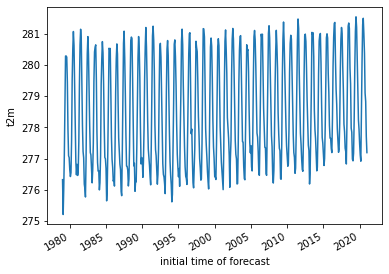
Compute mean value for each month across all years
Start with a
groupbyfor each of the 12 months, then take the mean in the time dimension
#climatology = t_mean_ds.groupby("time.month").mean("time")
Compute anomaly by removing these values from time series of monthly mean values
Note that this reduces the time dimension of the DataArray to integer for each month, dropping the ‘1981-01-01’, ‘1981-02-01’ labels in the ecv climatology dataset
#anomalies = t_mean_ds.groupby("time.month") - climatology
#climatology['t2m'].month
<xarray.DataArray 'month' (month: 12)> array([ 1, 2, 3, 4, 5, 6, 7, 8, 9, 10, 11, 12]) Coordinates: * month (month) int64 1 2 3 4 5 6 7 8 9 10 11 12
- month: 12
- 1 2 3 4 5 6 7 8 9 10 11 12
array([ 1, 2, 3, 4, 5, 6, 7, 8, 9, 10, 11, 12])
- month(month)int641 2 3 4 5 6 7 8 9 10 11 12
array([ 1, 2, 3, 4, 5, 6, 7, 8, 9, 10, 11, 12])
#(climatology['t2m']).plot(col='month', col_wrap=4, aspect=2, robust=True);
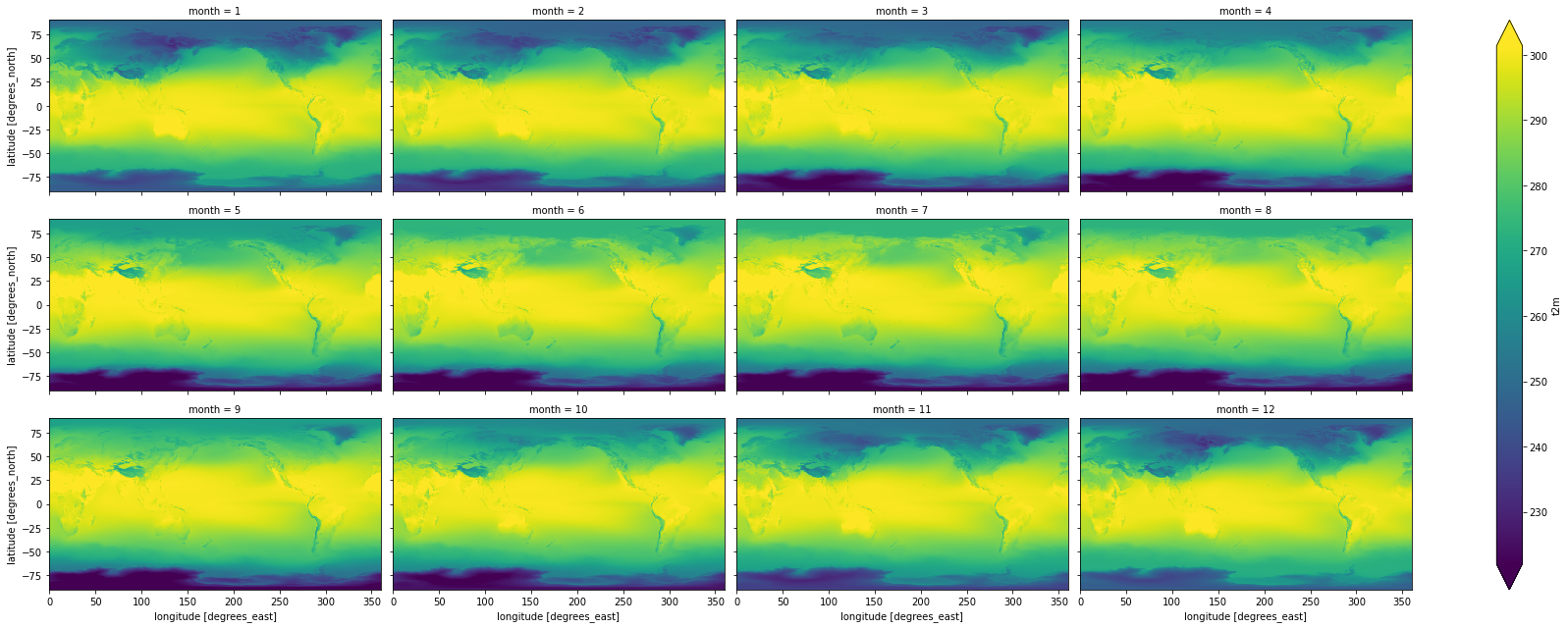
DES Note: I see some offsets in temperature values between our climatology and the ecv values. Need to explore further
#climatology['t2m'].values[0,0]
array([247.95518, 247.95518, 247.95518, ..., 247.95518, 247.95518,
247.95518], dtype=float32)
#t_clim_ds['t2m'].values[0,0]
array([247.47934, 247.47934, 247.47934, ..., 247.47934, 247.47934,
247.47934], dtype=float32)
How much memory would we expect the climatology and anomaly DataArray occupy in RAM? Is this consistent with observed usage?
Want to check
dtypehere
Convert the temperature values from K to C for the climatology dataset
Note: don’t need to do this for anomalies, as they are relative values, not absolute
These operations are done on the DataArray level (not the top-level DataSet object level), so you’ll need to modify
t_clim_ds['t2m']You can use
-=syntax hereOr, update the
t_clim_ds['t2m'].values
Make sure you also update the units
The units used by xarray are stored in the t_clim_ds[‘t2m’].attrs dictionary
There is also a GRIB units variable, but this is holdover from the grib to xarray conversion
Sanity check values
Set the longitude values to be (-180 to 180) instead of (0 to 360)
def ds_swaplon(ds):
return ds.assign_coords(longitude=(((ds.longitude + 180) % 360) - 180)).sortby('longitude')
t_clim_ds = ds_swaplon(t_clim_ds)
t_anom_ds = ds_swaplon(t_anom_ds)
t_clim_ds.longitude
<xarray.DataArray 'longitude' (longitude: 1440)> array([-180. , -179.75, -179.5 , ..., 179.25, 179.5 , 179.75]) Coordinates: * longitude (longitude) float64 -180.0 -179.8 -179.5 ... 179.2 179.5 179.8
- longitude: 1440
- -180.0 -179.8 -179.5 -179.2 -179.0 ... 178.8 179.0 179.2 179.5 179.8
array([-180. , -179.75, -179.5 , ..., 179.25, 179.5 , 179.75])
- longitude(longitude)float64-180.0 -179.8 ... 179.5 179.8
array([-180. , -179.75, -179.5 , ..., 179.25, 179.5 , 179.75])
Create a Facet plot showing temperature grids for each month in the climatology DataSet
Make sure your units are correct in the colorbar
Take a moment to admire this, look at seasonal cycles
Use Holoviz for interactive plotting
Multiple plotting backends can be used with xarray
We previously used Seaborn, and folium/ipyleaflet for interactive maps
Still under development, but
hvplotis flexible and powerful:
import hvplot.xarray
Create interactive plot with hvplot()
Note how coordinates and values are interactively displayed as you move your cursor over the plot
Experiment with time slider on right side
Experiment with zoom/pan capability
t_clim_ds['t2m'].hvplot(x='longitude',y='latitude', cmap='RdBu_r', clim=(-50,50))
Isolate the August array and plot
Review different strategies for selection here: http://xarray.pydata.org/en/stable/indexing.html
Use the
iselmethod with dimension name and integer index (time=7)Use the
selmethod with dimension name and label (time='2016-08-01')
#See time dimension index
t_clim_ds.time
<xarray.DataArray 'time' (time: 12)>
array(['1981-01-01T00:00:00.000000000', '1981-02-01T00:00:00.000000000',
'1981-03-01T00:00:00.000000000', '1981-04-01T00:00:00.000000000',
'1981-05-01T00:00:00.000000000', '1981-06-01T00:00:00.000000000',
'1981-07-01T00:00:00.000000000', '1981-08-01T00:00:00.000000000',
'1981-09-01T00:00:00.000000000', '1981-10-01T00:00:00.000000000',
'1981-11-01T00:00:00.000000000', '1981-12-01T00:00:00.000000000'],
dtype='datetime64[ns]')
Coordinates:
* time (time) datetime64[ns] 1981-01-01 1981-02-01 ... 1981-12-01
Attributes:
long_name: initial time of forecast
standard_name: forecast_reference_time- time: 12
- 1981-01-01 1981-02-01 1981-03-01 ... 1981-10-01 1981-11-01 1981-12-01
array(['1981-01-01T00:00:00.000000000', '1981-02-01T00:00:00.000000000', '1981-03-01T00:00:00.000000000', '1981-04-01T00:00:00.000000000', '1981-05-01T00:00:00.000000000', '1981-06-01T00:00:00.000000000', '1981-07-01T00:00:00.000000000', '1981-08-01T00:00:00.000000000', '1981-09-01T00:00:00.000000000', '1981-10-01T00:00:00.000000000', '1981-11-01T00:00:00.000000000', '1981-12-01T00:00:00.000000000'], dtype='datetime64[ns]') - time(time)datetime64[ns]1981-01-01 ... 1981-12-01
- long_name :
- initial time of forecast
- standard_name :
- forecast_reference_time
array(['1981-01-01T00:00:00.000000000', '1981-02-01T00:00:00.000000000', '1981-03-01T00:00:00.000000000', '1981-04-01T00:00:00.000000000', '1981-05-01T00:00:00.000000000', '1981-06-01T00:00:00.000000000', '1981-07-01T00:00:00.000000000', '1981-08-01T00:00:00.000000000', '1981-09-01T00:00:00.000000000', '1981-10-01T00:00:00.000000000', '1981-11-01T00:00:00.000000000', '1981-12-01T00:00:00.000000000'], dtype='datetime64[ns]')
- long_name :
- initial time of forecast
- standard_name :
- forecast_reference_time
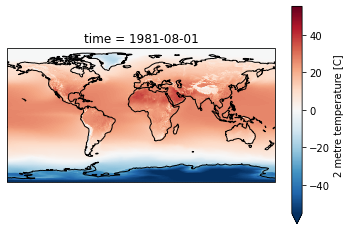
Create a plot for August, overlaying coastlines with cartopy
Use a simple PlateCaree() projection as in example here:
Once you have your axes setup, you should be able to plot with xarray easily (pass the axes object to plot() function:
http://xarray.pydata.org/en/stable/plotting.html#maps
Don’t use a discrete color ramp as in some of the examples, use a continuous linear color ramp, as in the facet plot.
Note how 2-m temperature varies with elevation (e.g., see the Tibetan Plateau)
f = plt.figure()
ax = plt.axes(projection=ccrs.PlateCarree())
ax.coastlines()
t_clim_ds['t2m'].sel(time=ts).plot(ax=ax, robust=True);
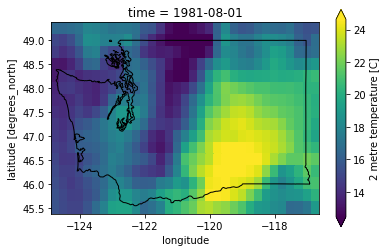
Clip to WA state
wa_rbounds
[-124.75, 45.5, -116.75, 49.25]
t_clim_ds_wa = t_clim_ds.sel(latitude=slice(wa_rbounds[3],wa_rbounds[1]), longitude=slice(wa_rbounds[0],wa_rbounds[2]))
t_anom_ds_wa = t_anom_ds.sel(latitude=slice(wa_rbounds[3],wa_rbounds[1]), longitude=slice(wa_rbounds[0],wa_rbounds[2]))
f, ax = plt.subplots()
t_clim_ds_wa['t2m'].sel(time=ts).plot(ax=ax, robust=True);
wa_state.plot(ax=ax, edgecolor='k', facecolor='none');
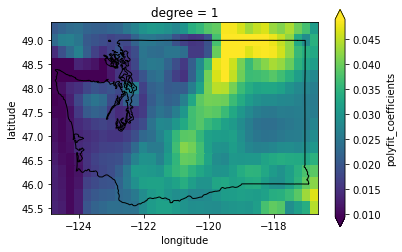
Extra credit: Compute linear temperature trend for WA state
#The difference along the time axis will return values in timedelta64[ns]
#We want degrees per year
#Input timestep is monthly
#Nanoseconds per month (avg)
dt_factor = 1E9 * 2628288
fit = t_anom_ds_wa['t2m'].polyfit(dim='time', deg=1)['polyfit_coefficients']
fit['degree'==1] *= dt_factor * 12
f, ax = plt.subplots()
fit.sel(degree=1).plot(ax=ax, robust=True);
wa_state.plot(ax=ax, edgecolor='k', facecolor='none');
Create line plot of global monthly temperature
Compute the mean of the climatology t2m DataArray across the spatial dimensions (can use
dim=('latitude', 'longitude')for this)
Create 2D plots showing mean temperature vs. latitude (averaged over all longitudes)
Create line plots of mean zonal and meridional temperature
Hint: specify a tuple of appropriate dimensions for the
dimkeyword when computingmean()Above we used
dim=('latitude', 'longitude')to average all latitudes and longitudes, plotting the resulting values over timeNow in the zonal mean case, we want to average for all latitudes and times, plotting resulting values vs. longitude
Create as figure with two subplots: meridional mean T and zonal mean T
Add titles accordingly
Create a plot showing monthly mean temperature for the Arctic and Antarctic
See location indexing here: http://xarray.pydata.org/en/stable/indexing.html#assigning-values-with-indexing
One approach:
Create boolean index arrays for
t_clim_ds['latitude']coordinate for relevant latitude rangesUse Arctic circle and Antarctic circle as a threshold
Use the index array with xarray
wheremethod on thet_clim_ds['t2m']DataArrayMake sure to use
drop=Trueto avoid unnecessarily storing lots of nan values in memory
Compute the mean across all returned lat/lon grid cells
Note the magnitude and phase of the seasonal temperature varability at the opposite poles
polar_lat = 66.5
#arctic_idx = slice(polar_lat,90)
arctic_idx = (t_clim_ds['latitude'] >= polar_lat)
antarctic_idx = (t_clim_ds['latitude'] <= -polar_lat)
nonpolar_idx = (t_clim_ds['latitude'] < polar_lat) & (t_clim_ds['latitude'] > -polar_lat)
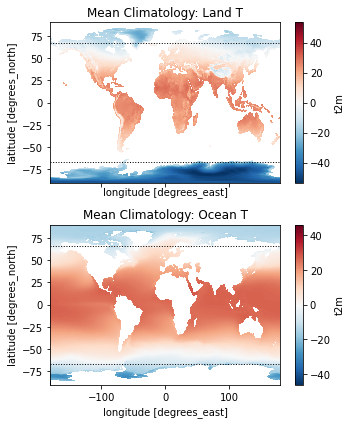
Extra Credit: Repeat the above analysis, isolating land and ocean classes
Hint: can use
rioxarrayfor clipping using a GeoDataFrame or geometry
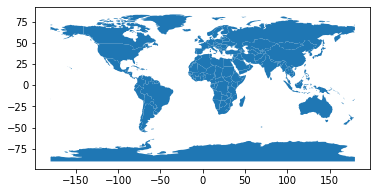
world = gpd.read_file(gpd.datasets.get_path('naturalearth_lowres'))
#Hack to set to latest PROJ syntax, instead of 'init'
world.crs = 'EPSG:4326'
world.plot();
Use simple clip function in rioxarray here
Code and documentation is still under development, but you can read more here:
import rioxarray
t_clim_ds.rio.write_crs(world.crs, inplace=True);
#Mask values over ocean
t_clim_ds_land = t_clim_ds['t2m'].rio.clip(world.geometry, crs=world.crs, drop=False)
#Invert to mask values over land
t_clim_ds_ocean = t_clim_ds['t2m'].rio.clip(world.geometry, crs=world.crs, drop=False, invert=True)
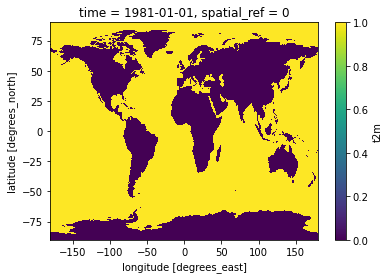
#Preview land mask
t_clim_ds_land.isel(time=0).isnull().plot();
f, axa = plt.subplots(2,1, sharex=True, sharey=True, figsize=(5,6))
t_clim_ds_land.mean(dim='time').plot(ax=axa[0], cmap='RdBu_r', clim=(-50,50))
t_clim_ds_ocean.mean(dim='time').plot(ax=axa[1], cmap='RdBu_r', clim=(-50,50))
axa[0].set_title('Mean Climatology: Land T')
axa[1].set_title('Mean Climatology: Ocean T')
kwargs = dict(color='k', lw=1.0, ls=':')
axa[0].axhline(polar_lat, **kwargs)
axa[0].axhline(-polar_lat, **kwargs)
axa[1].axhline(polar_lat, **kwargs)
axa[1].axhline(-polar_lat, **kwargs)
plt.tight_layout()
Temporal Variability: Anomalies
I heard somewhere that climate change was a hoax. Let’s check.
To do this, we will use the monthly anomalies from 1979-present.
Create a line plot of mean global monthly temperature anomaly from 1979-present
This should be a simple one-liner
Note: if you used xarray’s default lazy load of the
ncfile, and this is the first time reading the entiret_anom_dsfrom disk, this may take ~20 seconds
Did the Arctic and Antarctic warm at the same rate over the past 40 years?
Create a quick line plot showing anomalies for each region, you can reuse indices from above
Extra credit: compute linear temperature trend at each pixel and create a map with coastlines
Note: can coarsen the data to 1x1° to improve performance (16x!)
Extra credit: Group temperature anomalies by decade
See pandas/xarray
resamplefunctionRelevant aliases: https://pandas.pydata.org/pandas-docs/stable/user_guide/timeseries.html#dateoffset-objects
How does the most recent decade compare with the first decade in the time series?
Note that most first and last decade in the record might not be “complete” with 10 full years